Working from hotels can make it easier to balance business travel, work/life integration, and vacations without sacrificing personal time. However, hotel rooms are rarely optimized for productivity and may require extra effort to set up a familiar workstation. You may need to work with limited desk space, weak Wi-Fi connections, inconvenient power outlets, and uncomfortable seating.
The right travel tech can make working from a hotel more pleasant and efficient. A lightweight laptop, portable monitor, travel router, noise-canceling headphones, and charging accessories can dramatically improve your hotel experience without taking up too much space in your suitcase. However, not all travel tech is equal, and it can be challenging to determine your essential tools for working from a hotel.
Below are the top 10 travel gadgets and equipment for working from hotels.
1. Best Laptops for Remote Working
A reliable laptop is the centerpiece of any hotel workstation. From video conferencing and report writing to spreadsheet calculations and electronic document management, there is no doubt that a laptop is a must-have for business travelers. If your work involves using online applications, documents, emails, and video meetings, then a lightweight laptop that uses less power will be more suitable for working from a hotel. On the other hand, if you need to edit photos and videos, build websites, or perform other graphics-intensive tasks, then you will need to invest in a laptop with a better processor, graphics card, and RAM.
What to Look For:
- Weight class and general mobility
- Battery life and power-saving features
- Keyboard comfort and screen quality
- Integrated camera and microphone quality
- Memory and storage capacity
- Connectivity options and special features
A laptop with excellent battery life and reliable performance will be more valuable than a larger, more powerful laptop with fewer accessories and shorter battery life. Hotel workstations typically lack conventional outlets, so finding a power source inside a hotel room may sometimes be a challenge. Additionally, laptops with larger screens and comfortable keyboards will reduce eye strain and fatigue, which is especially important when working from a hotel.
Shop laptops for business travelers on Amazon
2. Portable Monitor for Working From Hotels
Laptops with larger screens, comfortable keyboards, and reliable battery life are usually heavier and more challenging to transport from one hotel to another. A portable monitor can help expand your laptop screen and transform a modest hotel desk into a more substantial workstation. With an extra screen, you can watch video tutorials or online meetings on one display while completing editing, spreadsheet calculations, or word processing tasks on another. Most portable monitors are compact and designed to fit in a laptop bag alongside your laptop and other accessories. A USB-C connection is convenient, but some portable monitors use an HDMI cable and a separate power supply, so make sure to research which devices you currently own before purchasing a new monitor.
Why It Works:
- Extra screen space for multitasking or video conferencing
- Easier document management and spreadsheet calculations
- Increased productivity
- Compact size and general portability
What to Look For:
- Screen size and overall portability
- Connection type and general compatibility
- Extra features, such as a built-in stand and privacy screen
- Screen quality and brightness
- General compatibility with your laptop or computer
A portable monitor is best suited for business travelers who need to complete multiple tasks simultaneously. Double-screening can be highly beneficial for spreadsheet calculations and managing several word-processing documents at once.
Shop portable monitors for laptops on Amazon
3. Noise-Canceling Headphones for Working From Hotels
It can be challenging to complete important tasks and remain focused when there are loud noises, announcements, and other disturbances. Noise-canceling headphones can block out unwanted sounds and allow you to concentrate on a complex spreadsheet or a challenging video. Furthermore, most noise-canceling headphones for working from hotels have built-in microphones and Bluetooth connectivity, making them ideal for hosting and attending video conferences.
Why It Works:
- Improved noise isolation and general focus
- High-quality microphones for video conferencing
- Multipoint connectivity for pairing with a smartphone and a laptop at the same time
- Extra comfort and battery life
- An additional option for entertainment
What to Look For:
- Noise-canceling features and overall noise isolation
- Comfort and general wearability
- Microphone quality and noise-canceling characteristics
- Battery life and USB-C connectivity
- Bluetooth connectivity and general compatibility
Noise-canceling features are not absolute, meaning that specific sounds will still penetrate the noise-canceling field. As mentioned above, most noise-canceling headphones are perfect for video conferencing. However, it is essential to take a closer look at the quality of the built-in microphone and overall connectivity features.
Shop wireless noise-canceling headphones on Amazon
4. Travel Router for Working From Hotels
Most modern hotels have Wi-Fi, but the signal strength and overall reliability of the connection can vary significantly depending on the establishment. A travel router is an excellent choice for anyone who needs a reliable connection but does not want to rely on the stability of a hotel’s Wi-Fi. Some travel routers can connect to a laptop via a USB cable, while others use the Wi-Fi connection of a smartphone or a regular Wi-Fi router. Finally, certain travel routers can create a private local Wi-Fi network and provide Wi-Fi connectivity through an Ethernet cable.
Why It Works:
- The ability to create a private local Wi-Fi network
- General versatility and overall connectivity
- The ability to connect multiple devices to the internet
- An additional option for entertainment
- Extra portability and battery life
What to Look For:
- General compatibility with various connection types
- The ability to operate with hotel Wi-Fi
- Overall security and special security features
- General compatibility with your laptop or computer
- Additional equipment, such as a built-in modem, cellular data connectivity, or a mobile hotspot
A travel router is a fantastic investment for business travelers who need to maintain an internet connection at all times. It is usually more accessible than maintaining a cellular data plan for every device you own.
However, it is crucial to remember that a travel router is not an ultimate solution for maintaining connection stability and security. Make sure that you only use apps and online services that have a proven security record and invest in additional security measures, such as a reputable virtual private network (VPN).
Shop portable travel Wi-Fi routers on Amazon
5. USB-C Multiport Hub or USB-C Docking Station
Modern laptops are generally smaller and lighter than their predecessors, but they also have fewer port connections. A USB-C multiport hub or a USB-C docking station can become an invaluable addition to your hotel workstation. It will provide you with additional port connections for a mouse, keyboard, monitor, memory cards, and other devices. While some travelers may find themselves in the position of needing to bring an entire desktop setup to the hotel, a multiport hub is an excellent option for anyone who wants to maximize their productivity while minimizing the amount of additional equipment they bring with them.
Why It Works:
- Additional port connections beyond your laptop’s capabilities
- General versatility and overall compatibility
- Increased productivity at the hotel workstation
- An additional option for entertainment
What to Look For:
- HDMI and/or DisplayPort connectivity (if you plan to use an additional monitor)
- USB-A connectivity (if you are planning to use additional USB devices)
- USB-C connectivity and general compatibility
- An Ethernet port (if you plan to use a wired internet connection)
- Special features, such as a built-in card reader
Not all USB-C ports are the same, and not all USB-C multiport hubs are compatible with the same laptops and applications. Some connections only provide power and do not enable video signals, while others support data transfer rates that are too low for modern monitors and peripheral devices. Always take a closer look at the video port specifications and general compatibility before making a final purchase.
Shop USB-C multiport hubs for laptops on Amazon
6. Compact USB-C Power Bank and Charging Cables
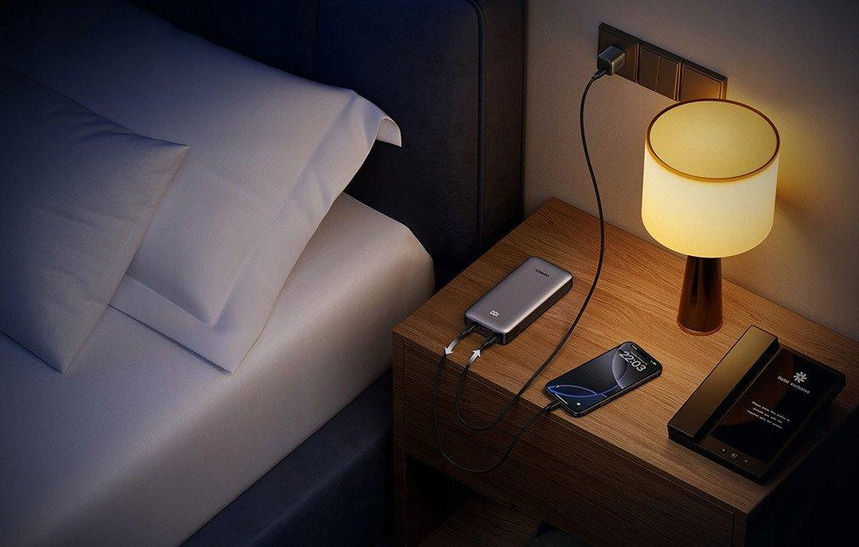
Charging your laptop, smartphone, smartwatch, and wireless earbuds can be a hassle when you are on the go and do not have access to a power outlet. While some modern smartphones and laptops have built-in USB-C Power Delivery (PD) charging, wireless earbuds and smartwatches generally require special charging docks. A compact USB-C power bank can be a convenient solution for anyone who needs to maintain a consistent power supply while traveling and working from a hotel.
Why It Works:
- Reduced overall bulk and simplified charging process
- General compatibility with a variety of devices and applications
- Increased productivity at the hotel workstation
- An additional option for entertainment
What to Look For:
- Overall power output and general compatibility
- USB-C PD connectivity and general compatibility
- Additional port connections and general compatibility
- Overall portability and general battery size
- General compatibility with travel restrictions and special safety regulations
A USB power bank generally requires at least one compatible charging cable, so make sure that the power bank you select is compatible with the charging cable you plan to use. A single USB-C PD cable generally allows for fast charging and data sync for most modern smartphones and laptops, but it is not suitable for most peripheral devices, such as mice, keyboards, and monitors. Always take a closer look at the specifications and ensure that the power bank is compatible with your laptop and applications before making a final purchase.
Shop multiport GaN USB-C chargers on Amazon
7. Compact Wireless Mouse and Compact Wireless Keyboard
Using a laptop for an extended period of time can be physically taxing and exhausting, especially when you are not used to using a laptop mouse and keyboard. A compact wireless mouse and a compact wireless keyboard can significantly enhance your comfort and productivity when working from a hotel.
Why It Works:
- Increased overall comfort and productivity
- Reduced overall bulk and increased portability
- General compatibility with most modern laptops and applications
- An additional option for entertainment
What to Look For:
- General compatibility and general portability
- Bluetooth connectivity and special features
- Comfort and overall portability
- Battery life and overall convenience
- Multipoint connectivity and general compatibility
A compact wireless mouse is generally more useful and versatile than a compact wireless keyboard. Most modern laptops have full-size keyboards with comfortable key spacing, but a laptop mouse is generally more precise and convenient than a trackpad. A separate mouse is especially useful if you need to work with complex spreadsheet calculations and graphical user interfaces (GUI). A compact wireless keyboard is only useful if you are planning to use a laptop stand or a separate laptop desk.
Shop compact wireless keyboard and mouse sets on Amazon
8. Laptop Stand for Working From Hotels
Hotel desks and chairs can be uncomfortable and unsuitable for a long working session. As such, a laptop stand can help you maximize your laptop screen height and organize your hotel workspace.
For extended use, a laptop stand should be used in conjunction with a separate laptop mouse and keyboard to create a more comfortable and ergonomic workstation.
Why It Works:
- Increased overall comfort and productivity
- Reduced overall bulk and increased portability
- General compatibility with most modern laptops and applications
- An additional option for entertainment
What to Look For:
- Overall portability and general stability
- General compatibility with your laptop or computer
- Comfort and overall screen height adjustment
- Additional special features and overall convenience
A laptop stand generally opens up a laptop keyboard and increases the overall screen height, but it does not necessarily improve the ergonomics of a small hotel desk. It is always advisable to bring a separate mouse and keyboard if you plan to use a laptop stand for extended periods of time.
Shop portable laptop stands on Amazon
9. Power Bank for Smartphones and Other Devices
A power bank for smartphones and other devices can be an excellent option for anyone who needs to maintain a consistent power supply while working from a hotel. A single power bank generally has enough power to charge a smartphone two or three times. However, most smartphones have relatively small battery capacity, so a larger power bank may be required for extended use.
Why It Works:
- Increased overall comfort and productivity
- Reduced overall bulk and increased portability
- General compatibility with most modern laptops and applications
- An additional option for entertainment
What to Look For:
- Overall power output and general compatibility
- USB-C PD connectivity and general compatibility
- Additional port connections and general compatibility
- Overall portability and general battery size
- General compatibility with travel restrictions and special safety regulations
As mentioned above, a single USB-C PD cable generally allows for fast charging and data sync for smartphones and laptops, but it is not suitable for most peripheral devices, such as mice, keyboards, and monitors. Always take a closer look at the specifications and ensure that the power bank is compatible with your laptop and applications before making a final purchase.
A regular power bank generally only provides power and does not allow for data sync, so make sure that you have additional accessories, such as a charging cable and a separate charging dock, if you plan to use the power bank with wireless earbuds or a smartwatch.
Before flying with a power bank, take a closer look at the airline’s safety and compatibility guidelines. A power bank is generally allowed in a carry-on bag, but it is incompatible with checked luggage. Most major airlines have a list of prohibited items, and most power banks that utilize lithium batteries are generally prohibited on international flights.
Shop power banks for smartphones on Amazon
10. Portable Webcam or Laptop Webcam Upgrade
If your job requires video conferencing, then a portable webcam is the perfect addition to your hotel workstation.
A portable external webcam generally provides a more reliable video feed than most laptop webcams. However, it is not always necessary to purchase a separate portable webcam if your laptop has a built-in camera. Most modern laptops have adequate built-in webcams that allow for reliable video conferencing.
Why It Works:
- Increased overall comfort and productivity
- Reduced overall bulk and increased portability
- General compatibility with most modern laptops and applications
- An additional option for entertainment
What to Look For:
- Overall portability and general compatibility
- Plug-and-play features and special functions
- Camera resolution and general video quality
- General compatibility with your laptop or computer
- A privacy cover or other security features
Before purchasing a new portable webcam, test your built-in laptop webcam and research which portable webcams are compatible with your laptop.
Generally, a portable webcam is only worth the investment if it solves a specific problem or improves an existing weakness in your laptop’s webcam.
Shop compact portable USB webcams on Amazon
How to Choose the Right Travel Tech for Working From Hotels
The list of the top 10 travel tech gadgets and accessories for working from hotels is not exhaustive. Always make sure to purchase the equipment and accessories that you need and want based on your individual requirements and preferences. Below are the most valuable travel tech gadgets and accessories based on the type of work you do.
| Travel Tech Accessories | Best For | Primary Features and Advantages |
|---|---|---|
| Lightweight laptop | Most remote workers | The most critical component of an extended workstation |
| Portable monitor | Multitasking and spreadsheet calculations | Adds an additional screen |
| Noise-canceling headphones | Video conferencing and general focus | Focus and video conferencing |
| Travel router | Frequent hotel stays | An alternative to unstable hotel Wi-Fi |
| USB-C hub | Users with multiple accessories | Adds additional port connections |
| GaN charger | Travelers with multiple devices | Provides an additional power source |
| Wireless mouse and keyboard | Extended laptop use | Improves productivity and comfort |
| Laptop stand | Extended laptop use | Improved ergonomics |
| Power bank for smartphones | Working away from power outlets | An alternative power source |
| Portable webcam | Frequent video conferencing | Improved video quality |
It is always advisable to purchase only the essential items from the list. A reliable laptop and additional laptop accessories, such as a laptop stand and noise-canceling headphones, are the primary necessities for most business travelers. A mouse, additional laptop screen, and other accessories are optional and depend on individual preferences and requirements.
Best Tips for Setting Up a Hotel Workstation
The equipment and accessories you bring with you are not the only factors that contribute to an improved hotel workstation. Below are some of the most useful tips for setting up a productive and comfortable hotel workstation.
1. Always Make Sure That the Wi-Fi Signal Is Stable Before Any Important Video Conferences
It can be stressful to realize that a crucial video conference is approaching and the Wi-Fi signal is unstable. Always make sure that the Wi-Fi signal is stable when you arrive at the hotel, and invest in an additional mobile data plan if necessary.
2. Always Make Sure That You Are Using an Appropriate Workspace
A laptop or a sturdy table is an absolute necessity for a comfortable and productive hotel workstation. Make sure that your workspace is well-lit and that you are using the most comfortable chair available in your hotel room.
3. Always Keep Your Charging Cables Organized
Paying close attention to your charging cables and keeping them organized in a small cable organizer will help you avoid the frustration and confusion of searching for the correct charging cable.
4. Always Protect Your Work Devices
Enable mixed-use security features for all work devices, invest in additional security measures, such as a private encryption application for laptops and smartphones, and keep your devices up to date. These simple measures will help you reduce the risk of exposing sensitive information or compromising your work devices.
5. Always Plan Around Your Laptop’s Battery Life
Charging your laptop before an important video conference and keeping a reliable laptop charger at your side will reduce the risk of a sudden and unexpected laptop shutdown.
6. Always Use a Headset or Headphones With a Built-In Microphone for Video Conferencing
A reliable microphone is essential for video conferencing, and using a headset or headphones with a built-in microphone will improve the quality and reliability of your video conferences.
7. Always Back Up Your Work Files in the Cloud
Invest in a long-term cloud storage service that your organization offers or a private cloud storage service. Always make sure that your work files are backed up in the cloud to reduce the risk of losing access to essential work documents.
8. Always Organize Your Travel Bags Around Your Work Necessities
If you only need your laptop and a few additional accessories, leave the rest of the equipment and accessories at home. Only bring additional screens or special accessories if you need them for an extended workstation.
Final Thoughts
A reliable laptop, noise-canceling headphones, compact laptop charger, and additional screen are the most valuable travel tech accessories for working from a hotel.
If you need to complete more demanding spreadsheet calculations, then a portable monitor and a USB-C hub are excellent additions to your hotel workstation. A laptop stand and a wireless mouse and keyboard are also valuable accessories for extended laptop use. Always make sure that you only purchase the travel tech accessories that you need and want to improve your productivity and comfort.
Amazon Affiliate Disclosure: As an Amazon Associate, I earn from qualifying purchases. If you buy something after clicking an Amazon.com link in this article, I may earn a commission.