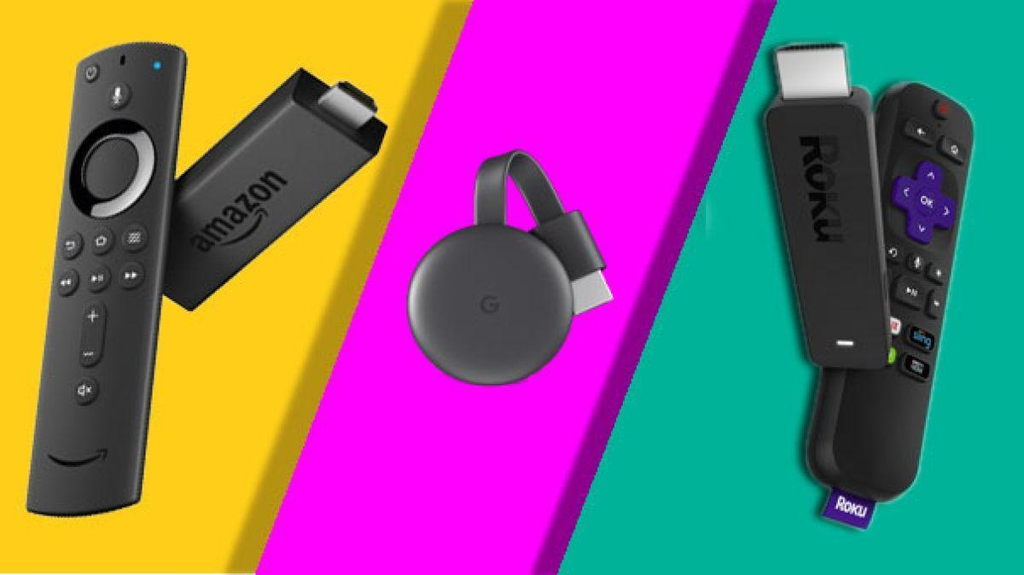
Choosing between Amazon Fire TV Stick, Roku and Google TV Streamer can be confusing, especially when all three offer ways to turn your television into a smart entertainment hub.
They all provide access to popular streaming services such as Netflix, Prime Video, Disney+, YouTube and many more. However, they differ in their interfaces, voice control options, smart home integration and overall viewing experience.
If you regularly use Amazon services and want Alexa voice control, the Fire TV Stick may be the right choice. If you prefer a simple interface with easy access to streaming applications, Roku is worth considering. If you enjoy casting content from your phone or use Google services, Google TV Streamer may be a better option.
There is also an important difference to understand: Google changed its Chromecast product range in 2024 and introduced Google TV Streamer as its newer streaming device.
In this guide, we’ll compare Fire TV Stick, Roku and Google TV Streamer, including their features, advantages, disadvantages and different models, to help you choose the right streaming device for your television.
Fire TV Stick vs Roku vs Google TV Streamer: Quick Answer
Here’s a quick overview of which device may be best for different users.
- Amazon Fire TV Stick: A great option if you use Alexa, Amazon Prime Video and want an affordable streaming device.
- Roku: A good choice for people who prefer a simple interface and straightforward navigation.
- Google TV Streamer: Best suited to people who use Google TV, Google Assistant, Google Home and Google Cast.
The right choice will depend on your existing devices, preferred streaming applications and how you like to watch television.

Amazon Fire TV Stick 4K Max
Best for Alexa and Amazon users
Offers 4K streaming, Wi-Fi 6E, and a familiar Alexa-powered experience.
Check Prize on Amazon

Roku Streaming Stick Plus
Best for simple everyday streaming
Combines a straightforward interface with 4K resolution and HDR10+.
Check Prize on Amazon

Google TV Streamer (4K)
Best for Google ecosystem users
Offers Google TV, personalized recommendations, casting, and smart-home features.
Check Prize on Amazon
Understanding the Three Streaming Platforms
Before comparing individual models, it’s important to understand how each streaming platform works.
1. Amazon Fire TV Stick

The Amazon Fire TV Stick connects directly to your television’s HDMI port, allowing you to access various streaming applications through the Fire TV platform.
It’s particularly useful if you already use Amazon Prime Video, Alexa or other Amazon services.
You can use the included remote to:
- Search for movies and television shows.
- Open supported streaming applications.
- Control compatible television functions.
- Use Alexa voice search.
- Access supported smart home features.
Some models also support advanced picture and audio technologies such as Dolby Vision and Dolby Atmos.
Advantages:
- Convenient integration with Amazon services.
- Alexa voice control.
- Access to popular streaming applications.
- Compact design.
- Different models available at different price points.
Disadvantages:
- The Fire TV interface can contain numerous recommendations and sponsored sections.
- Some models have limited storage.
- Certain advanced features require compatible televisions and equipment.
If you already use Amazon services, Fire TV Stick can provide a convenient entertainment experience.
2. Roku
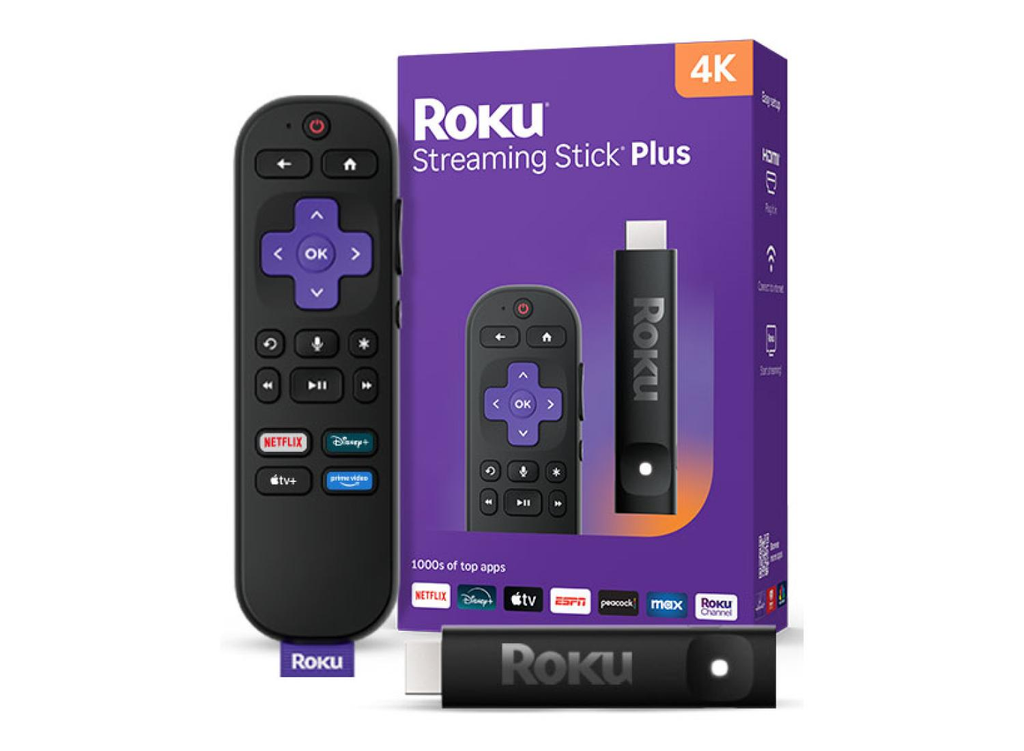
You can access your installed channels and streaming services directly from the Roku home screen.
Roku also offers The Roku Channel, which provides access to free, advertising-supported entertainment in supported regions.
One of Roku’s biggest advantages is its straightforward interface.
You can:
- Switch between streaming applications.
- Search for movies and television shows.
- Manage your installed channels.
- Access free streaming content.
- Use voice search with compatible remotes.
Advantages:
- Simple and easy-to-use interface.
- Convenient application navigation.
- Access to free streaming content.
- Compact streaming devices.
- Suitable for people new to streaming.
Disadvantages:
- Less suitable if you specifically want an Android-based streaming experience.
- Google integration is more limited than on Google TV Streamer.
- Some features vary by model and region.
- Advertising is included in parts of the platform.
If you want a straightforward streaming experience without complicated menus, Roku is worth considering.
3. Google Chromecast and Google TV Streamer

Google has changed its streaming device offering over the years.
Traditional Chromecast devices focused primarily on casting content from your smartphone, tablet or computer to your television.
Google later introduced Chromecast with Google TV, which included a full television interface and remote control.
Google has since discontinued its traditional Chromecast hardware line and introduced Google TV Streamer.
Unlike the older Chromecast devices, Google TV Streamer is a small set-top box rather than an HDMI stick.
It includes:
- Google TV interface.
- Voice search.
- Personalised content recommendations.
- Access to compatible streaming applications.
- Google Cast functionality.
- Google Home smart home features.
Advantages:
- Excellent integration with Google services.
- Convenient Google Cast functionality.
- Includes a dedicated remote.
- Smart home integration.
- Access to Google TV applications.
- More storage than many basic streaming sticks.
Disadvantages:
- Larger than traditional Chromecast devices.
- More expensive than many basic streaming sticks.
- Requires a separate HDMI cable.
- Some advanced features require compatible Google Home devices.
Google TV Streamer is a particularly good option if you regularly use Android devices, Google Home or other Google services.
Fire TV Stick vs Roku vs Google TV Streamer: Key Differences
Here’s a quick comparison of the three platforms.
| Feature | Fire TV Stick | Roku | Google TV Streamer |
|---|---|---|---|
| Interface | Fire TV | Roku OS | Google TV |
| Voice Assistant | Alexa | Roku Voice Search | Google Assistant |
| 4K Streaming | Selected models | Selected models | Yes |
| HDR Support | Depends on model | Depends on model | Yes |
| Casting | Varies by model | AirPlay on selected models | Google Cast |
| Smart Home | Alexa | Compatible integrations | Google Home |
| Free Content | Supported free apps | The Roku Channel | Supported free apps |
All three platforms offer many popular streaming applications, but their features and available services can vary by model and region.
Important Factors to Consider Before Choosing
1. App Availability
One of the most important things to consider is application compatibility.
You probably want access to popular services such as:
- Netflix.
- YouTube.
- Disney+.
- Hulu.
- Max.
- Prime Video.
Fortunately, all three platforms support many popular streaming services in supported regions.
However, there are some differences.
Fire TV: Uses the Amazon application ecosystem. Check compatibility with newer Fire TV devices, particularly models using Vega OS rather than Fire OS.
Roku: Provides access to streaming channels through the Roku platform.
Google TV: Uses the Google TV and Android TV application ecosystem and supports Google Cast.
If you regularly use lesser-known streaming services, check application availability before purchasing.
2. Picture Quality: Which Is Best for 4K Streaming?
All three platforms offer devices capable of delivering excellent picture quality.
However, purchasing a 4K streaming device doesn’t automatically mean you’ll receive 4K content.
You’ll also need:
- A 4K-compatible television.
- A compatible 4K streaming service or subscription.
- A sufficiently fast and stable internet connection.
- Compatible HDMI and HDCP support.
- Content available in 4K resolution.
Understanding HDR
HDR technologies can improve contrast, brightness and colour reproduction when supported by your television and streaming device.
Some common HDR formats include:
- HDR10.
- HDR10+.
- Dolby Vision.
- HLG.
Support varies between devices.
For example, the Roku Streaming Stick Plus supports HDR10, HDR10+ and HLG, while the Roku Streaming Stick 4K also supports Dolby Vision.
If your television doesn’t support Dolby Vision, purchasing a streaming device specifically for that feature may not provide additional benefits.
3. Ease of Use
The easiest streaming platform is largely a matter of personal preference.
Here’s how they compare.
Roku: A good option for beginners, older users and anyone who prefers straightforward navigation.
Fire TV: Offers convenient Alexa search and access to Amazon services. However, the home screen can feel busy because of recommendations and advertisements.
Google TV: Provides personalised recommendations and makes it easier to discover available content across supported streaming services.
There isn’t a perfect interface for everyone.
Choose the platform that feels easiest to navigate and manage.
4. Voice Control and Smart Home Integration
Voice control can make your streaming device more convenient.
Here’s what each platform offers.
Fire TV: Uses Alexa to search for movies, open applications and control compatible smart home devices.
Roku: Offers voice search and voice control through compatible remotes and devices.
Google TV Streamer: Integrates with Google Assistant and compatible Google Home devices.
If you already have several Alexa-enabled devices, Fire TV may feel more natural.
If your home uses Google Home, Google TV Streamer could be a better fit.
4 Streaming Devices Worth Considering
Now that you understand the differences between the platforms, it’s time to look at some individual devices.
Below are four options worth considering depending on your television, budget and preferred streaming experience.
The specifications and features listed below are based on manufacturer information.
1. Amazon Fire TV Stick 4K Max (2nd Gen)
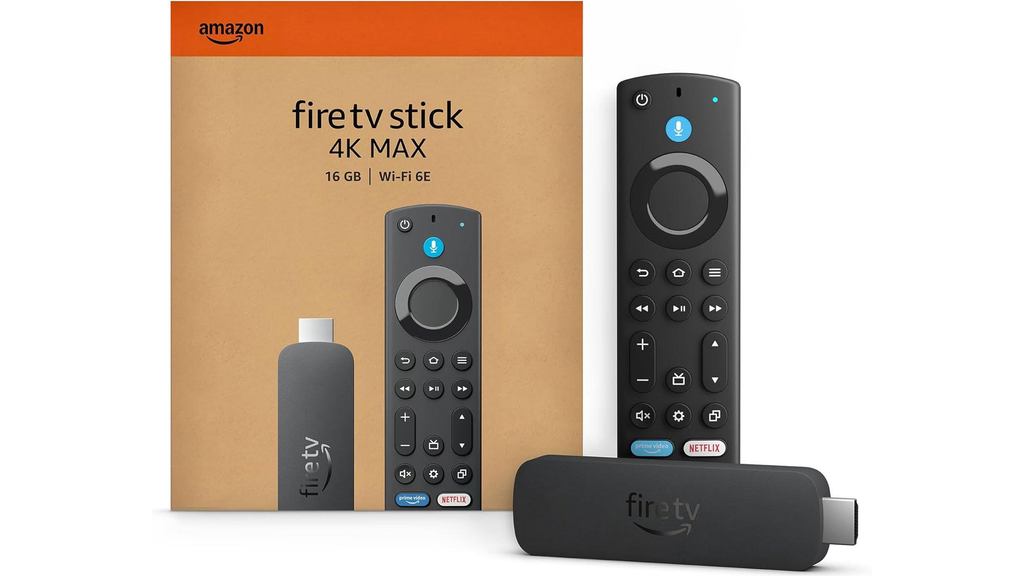
The Amazon Fire TV Stick 4K Max (2nd Gen) is a powerful streaming device for people who want additional features and 4K entertainment.
It supports 4K Ultra HD, Dolby Vision, HDR10+ and Dolby Atmos with compatible equipment.
It also includes Wi-Fi 6E support, which can be useful if you have a compatible router and multiple connected devices.
Key Features:
- 4K Ultra HD.
- Dolby Vision.
- HDR10+.
- Dolby Atmos.
- 16GB storage.
- Alexa Voice Remote.
- Wi-Fi 6E.
Advantages:
- Excellent support for video formats.
- Convenient Alexa voice control.
- More storage than many basic streaming sticks.
- Good integration with Amazon Prime Video.
- Compact design.
Disadvantages:
- The interface includes recommendations and advertisements.
- Some advanced features require compatible equipment.
- Wi-Fi 6E requires a compatible router.
- The 2nd Gen model is an older generation.
Who Should Buy It?
This is a good option if you regularly use Alexa, Prime Video and other Amazon services.
It offers a useful combination of streaming features, 4K support and voice control.
2. Roku Streaming Stick Plus (2025)

The Roku Streaming Stick Plus is designed for people who want straightforward streaming without complicated setup.
It connects directly to your television’s HDMI port.
One useful feature is that it can be powered through a compatible television’s USB port, helping reduce additional cable clutter.
Key Features:
- 4K streaming up to 60fps.
- HDR10, HDR10+ and HLG.
- Dual-band Wi-Fi.
- Roku Voice Remote with TV controls.
- USB-C power.
- Bluetooth Headphone Mode.
Advantages:
- Easy-to-use interface.
- Compact design.
- Access to free streaming content.
- Convenient voice remote.
- Suitable for everyday streaming.
Disadvantages:
- No Dolby Vision support.
- Requires a compatible 4K television for 4K viewing.
- Some applications require paid subscriptions.
- Includes advertising.
Who Should Buy It?
A good option for families, beginners and anyone looking for simple 4K streaming.
3. Google TV Streamer (4K)

Google TV Streamer (4K) is a good option if you prefer using Google’s entertainment ecosystem.
Unlike traditional Chromecast devices, it includes a complete streaming interface and dedicated remote.
It supports 4K HDR content and provides access to compatible applications through Google TV.
It also includes 32GB of storage and 4GB of memory.
Key Features:
- 4K HDR up to 60fps.
- Dolby Vision.
- HDR10+.
- Dolby Atmos.
- 32GB storage.
- 4GB memory.
- Google Cast.
- Gigabit Ethernet.
- Google Home smart home integration.
Advantages:
- Excellent integration with Google services.
- Convenient Google Cast functionality.
- Includes a dedicated remote.
- Wired Ethernet connection.
- Smart home features.
- More storage than many basic streaming sticks.
Disadvantages:
- Larger than traditional HDMI streaming sticks.
- Requires a separate HDMI cable, sold separately.
- More expensive than many basic streaming devices.
- Uses Wi-Fi 5 rather than Wi-Fi 6 or Wi-Fi 6E.
Who Should Buy It?
This is a good option if you use Android phones, Google Home, Google Photos and other Google services.
It’s also worth considering if you regularly cast compatible content from your mobile devices.
4. Roku Streaming Stick 4K

If you want Dolby Vision support, the Roku Streaming Stick 4K is another device worth considering.
It offers 4K streaming alongside Dolby Vision, HDR10+ and HLG support.
Its compact design makes it suitable for televisions where you don’t want another large device sitting on your entertainment stand.
Key Features:
- 4K streaming up to 60fps.
- Dolby Vision.
- HDR10, HDR10+ and HLG.
- Dual-band Wi-Fi.
- Voice Remote with TV controls.
Advantages:
- Dolby Vision support.
- Easy-to-use Roku interface.
- Compact streaming stick.
- Access to numerous streaming applications.
- Convenient remote control.
Disadvantages:
- Older model, originally launched in 2022.
- Dolby Atmos support depends on compatible equipment and content.
- Value depends on its current selling price.
Who Should Buy It?
This is worth considering if you specifically prefer Roku and want Dolby Vision support.
Compare its price with the newer Roku Streaming Stick Plus before purchasing.
Which Streaming Device Is Best for Different TVs?
Not every television has the same capabilities.
Your TV’s resolution, available HDMI ports and existing smart features can influence which streaming device is worth purchasing.
1. Older HD Television
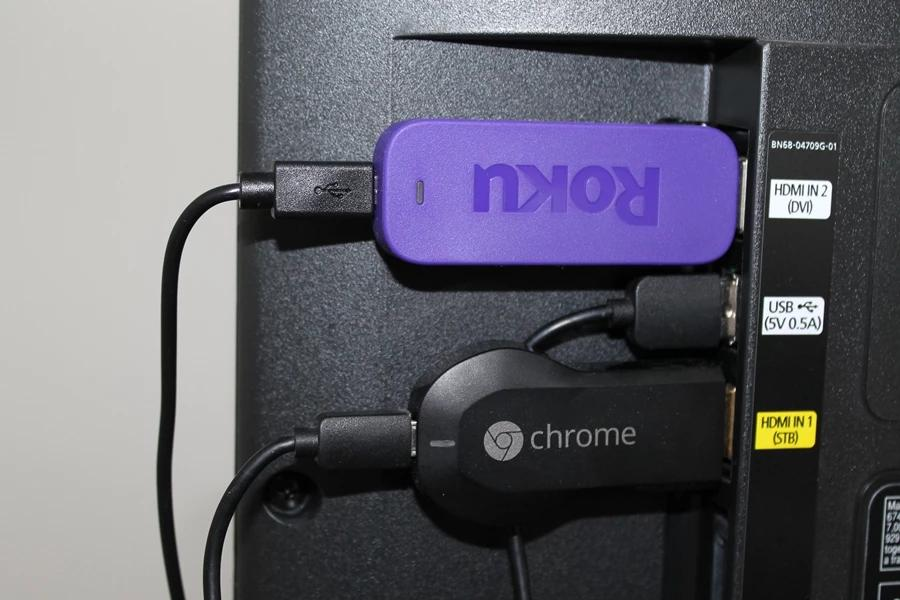
You don’t necessarily need an expensive 4K streaming device.
An HD streaming stick can provide access to popular streaming applications without paying for features your television cannot display.
Consider:
- An HD Amazon Fire TV Stick.
- A Roku Streaming Stick HD.
These can be suitable for bedrooms, guest rooms and secondary televisions.
2. 4K Smart TV

A 4K television can benefit from a streaming device that supports higher-resolution content and compatible HDR formats.
Consider:
- Fire TV Stick 4K Max: If you want Alexa integration and advanced wireless connectivity.
- Roku Streaming Stick Plus: If you prefer simple 4K streaming.
- Roku Streaming Stick 4K: If you want Dolby Vision support.
- Google TV Streamer: If you use Google services and enjoy casting.
However, check your television’s existing applications before purchasing.
You may already have everything you need.
3. Older Non-Smart Television

A streaming device can give an older television access to internet-based entertainment.
However, your TV will need:
- A compatible HDMI port.
- Suitable HDCP support.
- Access to Wi-Fi or another supported internet connection.
Remember that a streaming stick won’t improve your television’s actual resolution.
For example, if your television supports a maximum resolution of 1080p, it won’t display native 4K content in 4K.
Is the Original Chromecast Still Worth Buying?
This is an important question because many people still search for traditional Chromecast devices.
Google discontinued its traditional Chromecast hardware range in 2024 and introduced Google TV Streamer as its newer streaming device.
This means older Chromecast models are no longer the best recommendation for most new purchases in 2026.
Older devices may still work depending on their model, application support and compatibility.
However, consider the following limitations:
- Older hardware.
- Limited availability of new units.
- Potential differences in software and application support.
- No guarantee of long-term compatibility.
- Different functionality compared with newer streaming devices.
Instead, consider Google TV Streamer if you want a complete streaming experience with its own interface, remote and Google TV features.
If your main reason for buying a device is casting videos from your phone, check that your chosen device supports Google Cast.
Important Things to Consider Before Buying
Before purchasing a streaming device, consider these important factors.
1. Television Resolution
Check whether your TV supports HD, Full HD or 4K.
There is little reason to spend extra money on a premium 4K streaming device if you have an older HD television.
Choose a device that matches your television’s capabilities.
2. HDMI Compatibility
Most streaming sticks connect through HDMI.
Check that your television has an available HDMI port and the necessary HDCP compatibility for the content you want to watch.
3. Internet Connection
A stable internet connection is essential for reliable streaming.
Your connection quality will depend on:
- Router performance.
- Distance between the router and television.
- Network congestion.
- Number of connected devices.
- Streaming resolution.
If a device supports Wi-Fi 6E, you won’t benefit from that feature unless your router also supports compatible Wi-Fi technology.
4. Remote Control Features
Remote controls can make a significant difference to everyday use.
Consider whether you want:
- Voice search.
- Dedicated streaming application buttons.
- Television power and volume controls.
- Smart home voice control.
- Bluetooth headphone support.
Choose a remote that makes everyday navigation easier.
5. Application Compatibility
Make sure your preferred streaming applications are available on the device.
This is particularly important if you use niche streaming services or region-specific applications.
Final Verdict: Fire TV Stick vs Roku vs Google TV Streamer
There isn’t one streaming device that’s best for everyone.
Your decision should depend on your television, preferred applications, existing smart home devices and viewing habits.
Choose Amazon Fire TV Stick if:
- You regularly use Alexa.
- You subscribe to Amazon Prime Video.
- You want a compact streaming device.
- You prefer Amazon’s entertainment ecosystem.
The Fire TV Stick 4K Max offers plenty of features, although you may also want to consider newer Fire TV Stick 4K generations.
Choose Roku if:
- You prefer simple navigation.
- You want an easy-to-use interface.
- You enjoy accessing free streaming content.
- You want straightforward everyday streaming.
The Roku Streaming Stick Plus is a good option for everyday 4K streaming.
Choose Google TV Streamer if:
- You use Android devices.
- You regularly use Google Home.
- You enjoy Google Cast.
- You want a complete Google TV interface.
- You want additional smart home features.
It’s a more complete experience than traditional Chromecast devices.
Overall, Roku is an easy recommendation for people who want simple streaming and straightforward navigation.
However, Fire TV may be more convenient for Amazon users, while Google TV Streamer offers more flexibility for people already using Google’s ecosystem.
Compare current prices, check application compatibility and make sure your television supports the features you actually want.
Frequently Asked Questions
1. Is Fire Stick Better Than Roku?
It depends on your preferences.
Fire TV is particularly convenient if you use Alexa and Amazon Prime Video.
Roku is often easier for beginners because of its straightforward interface and navigation.
2. Is Chromecast Better Than Fire Stick?
It depends on how you use your television.
Google TV Streamer offers Google Cast, Google services and a personalised television interface.
Fire TV provides Alexa integration and an Amazon-focused entertainment experience.
3. Can I Use Fire Stick on Any TV?
A compatible Fire TV Stick can work with most televisions that have a suitable HDMI port.
However, your television’s resolution and supported features will determine the maximum picture quality you can enjoy.
4. Does Roku Have a Monthly Cost?
No. Roku does not generally require a monthly subscription simply to use its streaming platform.
However, individual streaming services such as Netflix and Disney+ may require separate paid subscriptions.
5. Does Fire Stick Require Amazon Prime?
No. You don’t need an Amazon Prime subscription to use Fire TV Stick.
You can access other supported streaming applications and free content.
However, certain content on Prime Video may require a subscription or additional payment.
6. Can I Watch Netflix on Roku, Fire Stick and Google TV Streamer?
Yes. All three platforms support Netflix in regions where the service is available.
You’ll need a compatible Netflix subscription to access its paid content.
7. Can I Use Chromecast Without a Smartphone?
Traditional Chromecast devices relied heavily on smartphones, tablets or computers for casting content.
However, Google TV Streamer includes its own remote and independent television interface, so you don’t need a smartphone for everyday navigation.
8. Is Google TV Streamer the Same as Chromecast?
No. Google TV Streamer is Google’s newer streaming device, introduced after the traditional Chromecast range was discontinued.
It offers a different design, dedicated remote, Google TV interface and additional features.
9. What Is the Best Streaming Device for an Older TV?
A basic HD Fire TV Stick or Roku Streaming Stick HD will generally be sufficient.
Make sure your television has a compatible HDMI port and supports the required connection.
10. Do Fire Stick, Roku and Google TV Streamer Support 4K?
Yes, selected models from all three platforms support 4K streaming.
However, you’ll need a compatible 4K television, suitable internet connection and content available in 4K resolution.
Final Thoughts
Choosing between Fire TV Stick, Roku and Google TV Streamer doesn’t have to be complicated.
All three platforms offer access to popular streaming services, but each provides a slightly different experience.
Fire TV Stick is a good option for Amazon users who want Alexa integration and convenient access to Prime Video.
Roku is ideal for people who prefer a straightforward interface and simple navigation.
Google TV Streamer is particularly useful for Android users, Google Home households and anyone who enjoys casting content from mobile devices.
Before purchasing, consider your existing television, streaming subscriptions, internet connection and the features you actually need.
You don’t necessarily need the most expensive streaming device. The best option is the one that makes watching your favourite movies and television shows easier.