
Artificial Intelligence is no longer just used for complex tech tasks and software. Instead, we can use AI tools to help us with everyday tasks.
The main benefit is making tasks that are repeated much quicker.
Rather than spending 20 minutes writing a professional email, you can instead quickly explain what you want to say and use an AI assistant to write it. Or instead of poring over long reports, you can ask an AI for a summary.
Small changes can make a big difference!
We will look at 15 easy everyday tasks you can complete using AI. We will look at how to use them, what tools can help and when you need to use your judgement.
What Makes a Task Good for AI?
AI is great for tasks involving:
- Repeated writing
- Creating structure
- Summarising long texts
- Brainstorming ideas
- Comparing
- Creating structure from notes
- Creating a draft
A good rule to remember is to use AI to create drafts, structure or repeated tasks.
Not every task needs to be automated. Begin with tasks that are repeated and don’t require much of your judgement.
15 Time-Saving Everyday Tasks Using AI
1. Writing Emails
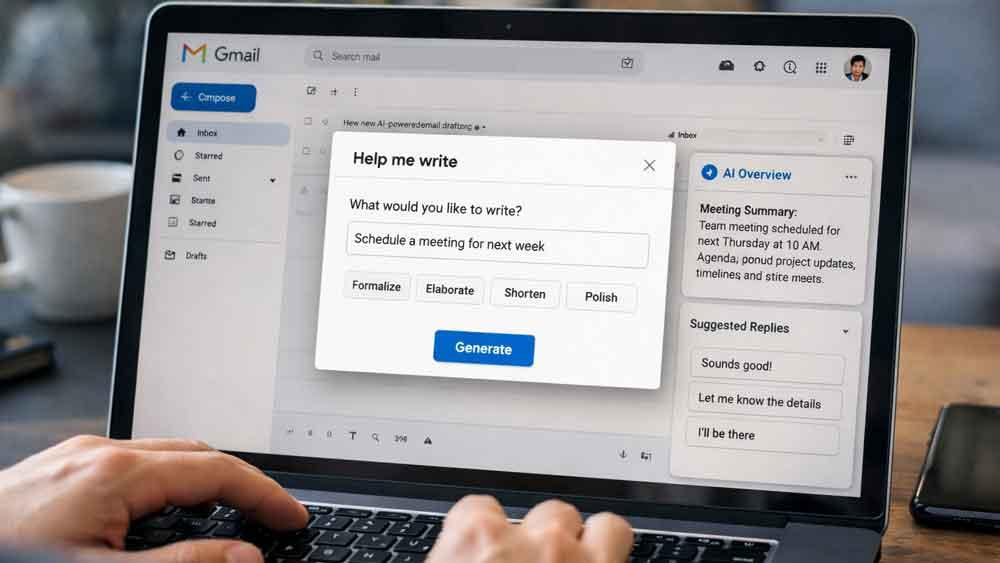
Sometimes writing emails can take longer than you expect. Especially if you need to make them sound professional, friendly and persuasive.
Using AI can help you:
- Write professional emails from brief notes
- Rewrite emails to sound friendlier/more professional
- Shorten long emails
- Write polite follow ups
- Improve grammar and clarity
Prompt:
Write a professional email asking my client to update me on the late payment. The email should be polite, friendly and firm. Keep it short and clear.
Tool: ChatGPT can help you write, rewrite and summarise messages.
Tip: Tell AI what you want to achieve, who you are emailing and what tone you would like. Then review the draft.
2. Summarise Long Documents

Long reports, research, manuals and articles can be time consuming to read through.
Using AI can help you extract key information.
Ask AI to:
- Summarise a long PDF
- Highlight key points
- Highlight any deadlines and action items
- Simplify complex topics
- Create bullet point notes
Prompt:
I want you to create a 10 point summary of this document. Highlight the most important findings, deadlines, risks and actions. Keep it simple.
Tool: ChatGPT can upload and summarise documents (depending on the file and plan).
Note: Always double check your document.
3. Plan Your Day

Often deciding what to do first can be time consuming. Especially if you have several tasks to complete.
Using AI can help you create a realistic daily plan from a list of unstructured tasks.
Give AI:
- Your working hours
- Personal commitments
- Key deadlines
- Estimated times to complete tasks
- Preferred break times
Prompt:
I would like you to help me create a realistic daily plan. I have tasks to complete between 9am and 6pm. Please prioritise urgent tasks and include a lunch break. I also want to leave 30 mins for any unexpected tasks.
AI can help you create a suggestion that you can adapt to fit your schedule.
Tools: ChatGPT and Microsoft Copilot.
4. Create a Shopping List and Meal Plan

When meal planning you need to consider the ingredients, dietary requirements, time and what you have in your kitchen.
AI can help you:
- Create a weekly meal plan
- Suggest recipes based on the ingredients you have
- Create a structured shopping list
- Suggest quick meals for busy weekdays
- Find ways to use up leftover ingredients
Prompt:
Create a 7 day meal plan to feed 2 adults. Keep the recipes simple, using affordable ingredients. Try to use ingredients that can be reused. Create a structured shopping list.
You can also ask AI to create meals based on ingredients you have.
This will help you save time by reducing the time spent deciding what to cook and creating multiple shopping lists.
5. Convert Voice Notes

Often you have great ideas when you are on the go. Whether that be in the car, walking, commuting or away from your desk.
Rather than typing, you can use an appropriate recording or transcription tool to record your voice notes.
AI can help you create:
- Meeting notes
- Task lists
- Blog ideas
- Reminders
- Project outlines
- Structured notes
Prompt:
I want you to convert this voice transcription into meeting notes. Please separate the discussion points, decisions, responsibilities and actions.
Tools: ChatGPT has a voice and audio function. There are also specific transcription tools. This will depend on your plan and device.
6. Research Products
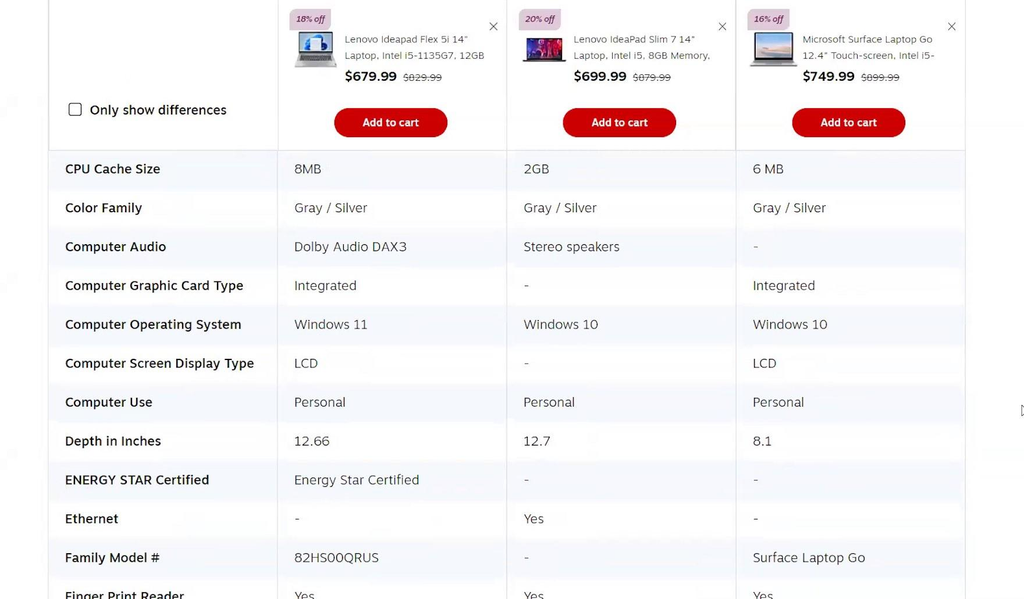
Sometimes when shopping online you can spend a lot of time looking through different products. Reading through specifications and comparing different models.
You can explore products on Amazon.com.
AI can help you create a comparison.
Ask AI to:
- Compare product specifications
- Explain technical features
- Highlight differences between models
- List any potential negatives
- Suggest questions to research
Prompt:
I want to compare 3 wireless headphones for everyday use. Please consider comfort, battery life, quality of microphone, noise cancelling, compatibility and warranty. Please split the information into verified specifications and your opinion.
AI can help organise your research. However, it’s important to double check the current pricing, availability, warranty and specification from the manufacturer/retailer.
7. Improve Grammar

You don’t need to be a professional writer to create clear and professional communications.
AI can help you improve:
- Grammar
- Punctuation
- Sentence structure
- Clarity within paragraphs
- Professional tone
- Vocabulary
Prompt:
Please rewrite this paragraph. Make sure it reads naturally in American English. Please ensure there are no grammatical errors and remove any unnecessary words. Don’t make it sound too formal.
This can be great for emails, reports, websites, presentations and everyday messages.
8. Create Meeting Notes

Having a clear understanding of why you are having a meeting and what is expected can help keep meetings productive.
AI can help you create:
- Meeting notes
- Questions to ask
- Updates on projects
- Action items
- Follow up emails
- Meeting notes from transcripts
Prompt:
Create a 30 minute meeting notes. Please include key discussion points, decisions needed and questions to ask the development team.
Microsoft Copilot can also help with conversation summaries and organising insights from meetings within supported Microsoft 365 environments.
9. Learn New Difficult Topics

Having an assistant to explain topics in your preferred level can make learning new things easier.
AI can help you:
- Explain complex topics
- Give examples
- Create revision notes
- Create practice questions
- Explain new vocabulary
- Create beginner friendly learning plans
Prompt:
I want to learn the basics of personal finance. Please create 5 short lessons. Explain each topic using examples. After each lesson please give me 3 practice questions.
You can also ask AI to explain the topic in different ways until you understand.
10. Create Presentations

Often creating a presentation can be time consuming. As you need to organise your ideas, write content and decide what information to include.
AI can help you:
- Create presentation outlines based on your notes
- Suggest presentation titles
- Create structure
- Create speaker notes
- Simplify complex explanations
- Suggest visual ideas
Prompt:
I want you to create a 10 slide presentation based on these notes. Each slide should have a clear title, 3-5 bullet points and suggested visual. Please finish with a summary slide.
You can then use the outline to create your presentation in Powerpoint, Google Slides or another application.
11. Manage Personal Budgets

Having your financial information organised can make it easier to track your spending.
AI can help you:
- Categorise your spending
- Summarise your spending
- Explain formulas in your spreadsheet
- Identify any anomalies
- Create monthly summaries
- Compare planned vs actual spending
Prompt:
I have a spreadsheet showing my monthly spending. Please group my spending into categories. Calculate what % I am spending in each category. Identify where I could potentially save money.
ChatGPT has data analysis features. This will depend on your plan and tools.
Note: Remove any account numbers, payment information and other sensitive personal information. Double check all calculations.
12. Work with Spreadsheets

Whilst using spreadsheets can be useful, they can be time consuming to format, create formulas and organise.
AI can help you:
- Create formulas in Excel
- Explain errors in your spreadsheet
- Clean up inconsistent data
- Create conditional formatting
- Summarise tables
- Suggest charts
Prompt:
I have a spreadsheet showing customer names, order dates, product category and sales. Please explain how I can calculate my monthly revenue by product category. Suggest an appropriate chart.
This can be very useful for freelancers, small business owners, students and office workers.
14. Create Social Media Content

To stay active on social media you need plenty of ideas.
AI can help you create:
- Captions
- Short videos
- Ideas
- Content calendars
- Promotional messages
- Alternative headings
- Audience specific content
Prompt:
I want you to create a 7 day Instagram content calendar for a small home décor business. Please include 1 idea per day, a caption suggestion and a call to action. Keep the tone friendly and informative.
AI generated content should be double checked for accuracy, originality, brand and relevance.
15. Prepare for Important Conversations

Preparing for an interview, negotiation, difficult conversation or important phone call can be stressful.
AI can help you practise.
Ask AI to:
- Create common interview questions
- Practise an interview
- Help you organise your points
- Suggest professional answers
- Identify potential objections
- Make your answers clearer
Prompt:
Please act as the interviewer for a Marketing Manager role. Ask me one question at a time. Assess my answers and suggest ways to make them clearer and more effective.
This means AI can be a great practise tool.
How to Get Started Using AI Easily
You don’t need to know any advanced technology or spend hours playing around with different applications.
The easiest way to begin using AI is to slowly introduce it into your current routine.
Try this simple 5 day challenge:
Day 1 – Improve your writing
Use AI to help you write an email, rewrite or improve a paragraph.
Day 2 – Plan your day
Give AI your list of tasks and ask it to prioritise.
Day 3 – Save time researching
Ask AI to summarise an article or compare products.
Day 4 – Simplify personal tasks
Generate a shopping list, weekly meal plan or travel checklist.
Day 5 – Create structured information
Use AI to turn your notes, meeting discussions or spreadsheet into structured information.
After 5 days identify which tasks actually helped you save time and continue using AI for these tasks.
How to Create Better Prompts
Often the quality of your AI response will depend on how clearly you explain what you want.
A vague prompt such as ‘Help me with my work’ won’t give much direction.
Instead try explaining what you want, provide context and what you want the answer in.
A Simple AI Prompt Formula
Task: What do you want AI to do?
Context: What information do they need?
Requirements: What should they include/exclude?
Format: How should the answer be presented?
Example:
Create a weekly work schedule (Task) using my working hours of 9am-5pm (Context). Please prioritise important deadlines and include regular breaks (Requirements). Please present this in a simple daily schedule (Format).
You can also ask questions to improve an existing answer. For example:
- Can you shorten this?
- Can you explain this in simpler terms?
- Can you give me 3 practical examples?
- Can you highlight any potential errors?
- Can you create a checklist?
- Can you separate the facts from your assumptions?
Don’t worry about getting your prompts perfect. Think of AI as a conversation.
What Everyday Tasks Shouldn’t Be Fully Automated With AI?
Whilst AI can help you save time, it is not always reliable.
Some tasks require careful monitoring.
| Task | How to use AI responsibly |
|---|---|
| Medical decisions | Use AI for general explanations only. |
| Financial decisions | Use AI to organise information. Double check calculations and advice. |
| Legal documents | Use AI for initial explanations. |
| Emails | Double check who you are emailing, what you are sending and any attachments. |
| Online purchases | Double check who you’re purchasing from, specifications, price and returns. |
| Important research | Double check original sources and evidence. |
| Personal information | Don’t upload any sensitive information unnecessarily. |
Sometimes AI can provide incorrect information, misunderstand what you want and be confident with uncertain answers.
Always double check that the information provided is accurate, relevant and suitable for your situation.
For further guidance refer to the Federal Trade Commission.
FAQs
1. What Are the Most Useful Everyday Tasks AI Can Do?
Some of the most useful tasks AI can do are writing emails, summarising documents, organising your schedule, creating shopping lists, meal planning, researching products, creating presentations and analysing spreadsheets.
These are great tasks to use AI for as they often involve repetitive tasks and organisation.
2. Can AI Really Help Save Time Everyday?
Yes! AI can help reduce the effort needed for repetitive tasks such as writing emails, summarising long documents and creating initial plans.
Depending on how complex the task is, how clear your prompt is and how much editing you need to do, you may save some time.
3. What Is the Best AI Tool for Everyday Tasks?
ChatGPT is a great all-round tool to begin with. It can help with writing, brainstorming, summarising, learning and researching.
If you use a lot of Google products, Google Gemini may be a good option. If you use a lot of Microsoft applications, Microsoft Copilot is also worth considering.
It will depend on what you currently use and what features you want.
4. Can Beginners Use AI?
Absolutely! Most modern AI assistants can take simple instructions.
Just tell AI what you need and it will do its best!
5. Are Free AI Tools Enough?
For most basic tasks yes.
You can use free tools for simple writing, brainstorming, explanations and some planning. However paid subscriptions may offer more features, higher usage and advanced features.
Check what the current plans are with each provider.
6. Can AI Help With Household Tasks?
Yes! AI can help with meal planning, shopping lists, cleaning schedules, travelling, event planning, recipe suggestions and organising family activities.
It can also help turn a list of household tasks into an easy to manage weekly checklist.
7. Is It Safe to Upload Personal Documents?
Be cautious. Check the privacy settings and data policies of the service.
Don’t share any passwords, bank details, government ID numbers, confidential business documents or other sensitive information unless you have an appropriate, secure and authorised process.
8. Will AI Replace Human Work?
AI can help automate or assist with specific tasks. However it won’t replace human judgement, creativity, accountability and decision making.
Often it’s best to use AI to assist with tasks whilst keeping human oversight.
Final Thoughts – Let AI Do the Repetitive Tasks!
The real benefit of using AI for everyday tasks isn’t necessarily doing complex projects. It’s making everyday tasks easier.
Whilst writing an email, organising your schedule, creating a shopping list, summarising a document or understanding a difficult topic may seem like small tasks, using AI regularly to make them easier can reduce the time you spend on everyday preparation and allow you to focus on work and activities that matter.
Begin by identifying one task that regularly disrupts your day. Find an AI tool that can help you and give clear instructions. Then double check the outcome.
Once you know what works, slowly begin to introduce AI into other areas of your routine.
The aim isn’t to let AI take over your life, but to make everyday life a little easier.