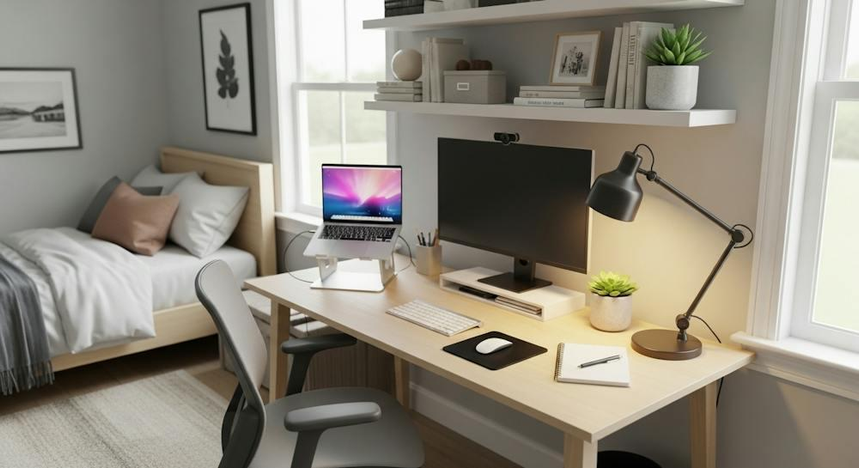
Working from your apartment can be a challenge if your desk is also your dining table or if space is at a premium. It can be difficult to find computer accessories that make working from home easier on your back, organize your cables, and save space in your small home office.
The good news is that you don’t need an expansive office to make your at-home setup more comfortable. A few strategically placed accessories can make working from home more enjoyable, whether you’re in a studio, a small home office, or a bedroom.
In this guide, we’ll discuss the best computer accessories for working from a small apartment.
1. Monitor Arm
If saving space is a priority and you use an external monitor, a monitor mount could be the perfect accessory for you. Monitor arms free up space on your desk by raising your display above the surface. From there, you can adjust the height, depth, and rotation of your monitor. Some stands also allow for portrait orientation, which is useful when viewing documents.
When selecting a monitor arm, make sure to note the weight and size of your monitor, as well as the type of mounting hardware it uses. Clamp-style monitor arms are suitable for small desks, but ensure that your desk can support the item.
Who it’s perfect for: Users with external displays who need to maximize desk space.
What to look for: Cable management, height adjustment, and monitor size and weight compatibility.
Amazon: Best Monitor Arms
2. Compact Wireless Keyboard and Mouse
A keyboard and mouse can take up a considerable amount of space on a small desk, especially if you use a full-sized keyboard and a wired mouse. A compact wireless keyboard and mouse can save space and allow you to quickly clear your desk when you need to.
Consider a tenkeyless keyboard or something even smaller, like a 60% or 75% keyboard, if you don’t plan to use the number pad. For a mouse, look for something with adjustable DPI settings that you can adjust on the fly.
Make sure that whatever keyboard and mouse you purchase are compatible with your computer and that the mouse has an appropriate battery life. If you use the peripherals with more than one computer, make sure that the keyboard and mouse are compatible with all of them.
Who it’s perfect for: Laptop users with external peripherals or those with small home offices.
What to look for: A compact keyboard, a convenient mouse, and compatibility with your PC.
Amazon: Best Compact Wireless Keyboard and Mouse Sets
3. Laptop Stand
If you’re a laptop user, you might want to consider purchasing a laptop stand. A stand allows you to raise your display to eye level, which can help reduce strain on your neck and back.
Laptop stands also free up space underneath the stand for a mouse or other peripherals. If you’re using a stand in a small space, a foldable stand may be your best option because of its portability.
For extended use, consider purchasing a stand that allows you to connect a mouse and keyboard to your computer. This lets you position your hands separately from the laptop and may help reduce wrist discomfort.
Who it’s perfect for: Remote workers who use a laptop as their primary device.
What to look for: Eye-level display positioning, space beneath the laptop, and portability for shared spaces.
Amazon: Best Foldable Laptop Stands
4. USB-C Hub
Hubs allow you to connect multiple accessories to your computer through a single port. Some hubs have USB-A ports, an HDMI port, an SD card slot, an Ethernet port, and more. Due to their compact size, these hubs can help reduce clutter on your desk while working from home.
If you’re using a laptop that doesn’t have many ports, a USB-C hub can be a great investment. Make sure that the hub you purchase is compatible with your computer’s USB-C port and that the port supports video output and power delivery where needed.
Who it’s perfect for: Laptop users who need to connect a monitor, speakers, a mouse, a keyboard, and other peripherals.
What to look for: The ports your accessories and computer require, video output compatibility, and power delivery specifications.
Amazon: Best Compact USB-C Hubs
5. Under-Desk Cable Management Tray
Cords and cables can be a major eyesore and safety hazard if left lying around. A cable management tray keeps cords organized and out of the way. Trays that attach underneath your desk are useful because they keep cords from running across the desktop, where they can get in the way.
Cable management trays can be attached using screws or clamps. If you’re using a rented desk or one that you don’t want to drill into, make sure the tray you purchase doesn’t require screws to install. Ensure that the tray isn’t overloaded and that the manufacturer’s recommended load capacity isn’t exceeded. When using a tray with a power strip, follow the spacing and safety guidelines provided by the power strip’s manufacturer.
Who it’s perfect for: Anyone who needs to manage multiple cords, including chargers and cables for peripherals.
What to look for: A mounting system compatible with your desk, appropriate size, and recommended load capacity.
Amazon: Best Under-Desk Cable Management Trays
6. Compact Desk Lamp With Adjustable Brightness
Lighting is important, but it can be challenging to fit a floor lamp or desk lamp into a small home office. Fortunately, compact lamps take up less space while providing useful task lighting. If you’re using a compact lamp, make sure it has an adjustable arm so you can direct the light toward your keyboard, mouse, or paperwork.
Many compact lamps allow you to adjust brightness and color temperature. This helps you choose the amount and tone of light that suits your needs. If you’re using a clamp-on desk lamp, make sure your desk can support it and that the clamp doesn’t scratch the surface.
Who it’s perfect for: People who need to work in dimly lit spaces, such as corners and bedrooms.
What to look for: An adjustable lamp arm, brightness controls, and a stable base or secure clamp.
Amazon: Best Compact LED Desk Lamps
7. Headset Stand or Under-Desk Headphone Hook
Headphones can take up a lot of space on a small desk, but a headset stand or an under-desk headphone hook can save space while keeping your headphones within reach. An under-desk headphone hook is particularly useful for small offices because it mounts underneath the desk and takes up minimal space. Some hooks even include cable management features or a small charging area.
If you’re using wireless headphones, make sure the hook is positioned away from areas where liquids could spill onto them and that the hook is stable.
Who it’s perfect for: Remote workers who use a headset to communicate.
What to look for: Stable installation, appropriate size for your headphones, and a location that reduces the risk of spills.
Amazon: Best Under-Desk Headphone Hooks
8. Compact Surge Protector With USB Ports
Chargers, lamps, monitors, computers, and phones all require power, but a small home office may not have enough outlets for every device. A compact surge protector with USB ports can help by providing multiple outlets along with USB charging options.
Make sure the surge protector has the appropriate electrical rating for the devices you plan to use. Pay close attention to the spacing between outlets and the length of the cable. Choose a longer cable if the supplied one isn’t sufficient to reach an outlet safely.
Avoid exceeding the recommended load capacity of the surge protector. Also, avoid connecting multiple power strips together unless the manufacturer explicitly permits the configuration.
Who it’s perfect for: People with multiple devices that need power but don’t have access to enough wall outlets.
What to look for: The power requirements of your devices, electrical rating, outlet spacing, and overall size.
Amazon: Best Compact Surge Protectors With USB
9. Desk Mat With a Non-Slip Base
Desk mats protect your desk while providing a consistent surface for your laptop, keyboard, and mouse. If you’re using a small desk, make sure the mat isn’t larger than your available workspace. Choose a mat with a non-slip bottom if you’re using a glass or wooden desk, and consider an easy-to-clean material if your desk doubles as a dining table.
A desk mat isn’t a space-saving accessory, but it can make your small home office feel more organized.
Who it’s perfect for: People who want to organize a small desk space.
What to look for: Appropriate size for your desk, a non-slip surface, and easy-to-clean materials.
Amazon: Best Small Desk Mats
10. Foldable Laptop Table
Not everyone has a dedicated desk in their home office, so a foldable laptop table can provide a surface for working. These tables can be used beside a sofa or bed, or as a place to set up your laptop in the kitchen or living room.
If you’re using a foldable table in your apartment, make sure it has a stable structure, an appropriate height, and a large enough surface for your laptop and peripherals.
For extended use, a properly sized laptop table is important because working at a low surface for long periods can become uncomfortable.
Who it’s perfect for: Studio apartment residents and people who need a foldable workspace in shared areas.
What to look for: A stable structure, appropriate height and size, and portability.
Amazon: Best Foldable Laptop Tables
11. Small Drawer Organizer for Computer Accessories
Cords, chargers, USB-A to USB-C cables, pens, and batteries can all take up space on a small desk. A small drawer organizer helps keep these items organized in a drawer rather than scattered across your workspace. You could also use a drawer from a desk organizer or a set of small containers.
If you’re working in a shared space, a drawer organizer helps keep work-related items in one place and makes it easier to pack everything away at the end of the day.
Who it’s perfect for: People who need to organize small accessories, such as pens, cables, and batteries.
What to look for: The size and location of the organizer and the types of accessories you use.
Amazon: Best Compact Desk Drawer Organizers
12. Portable SSD
Portable SSDs are compact storage devices that offer useful capacity for large graphics files, spreadsheets, documents, and more. They’re particularly helpful if you’re using a laptop with limited internal storage or need to transfer files between devices.
Before purchasing an SSD, make sure it’s compatible with your computer and offers the storage capacity you need. If you’re using a portable SSD for important work files, maintain additional backups in case the drive is damaged or stolen.
Who it’s perfect for: Photographers, graphic designers, writers, and anyone who works with large files.
What to look for: Storage capacity, connection type, transfer speeds, and a reputable manufacturer.
Amazon: Best Portable External SSDs
How to Choose Computer Accessories for Working From Home in a Small Apartment
You don’t need to purchase every accessory on this list. Instead, examine your workspace and prioritize the accessories that address your biggest challenges.
| Your issue | Best accessory or accessories |
|---|---|
| Not enough desk space | Monitor arm, compact keyboard, and laptop stand |
| Too many loose cords | Cable tray, USB-C hub, and compact surge protector |
| Not enough lighting | Adjustable desk lamp |
| No dedicated office space | Laptop stand, foldable laptop table, and portable accessories |
| Too many small accessories to organize | Headphone hook and drawer organizer |
| Not enough storage space on your laptop | Portable SSD |
If you’re on a budget, purchase a laptop stand, compact keyboard and mouse, and cable management tray first. These three accessories can make a noticeable difference without requiring a complete workspace makeover.
Before making a purchase, make sure the accessory is compatible with your setup and that you have enough space to use it. A laptop stand or foldable laptop table may be more useful than an oversized desk. If you’re unsure which accessories to purchase, start with the essentials and add more as needed.
Final Thoughts
The best computer accessories for working from a small apartment are those that make working from home more comfortable and convenient without taking up too much space. Monitor arms, compact keyboards, laptop stands, USB-C hubs, and cable management trays are all great places to start.
If you don’t have enough room for a dedicated home office, portable accessories and foldable furniture can help you make the most of the space you have. Start with the most useful accessories, purchase only what you need, and upgrade as necessary.
Amazon Affiliate Disclosure: As an Amazon Associate, I earn from qualifying purchases. If you buy something after clicking an Amazon.com link in this article, I may earn a commission.