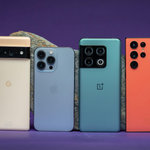
Switching from an iPhone to Android involves more than comparing purchase prices. Buyers must adjust to a different home screen, system settings, app store, photo library, messaging system, and backup process.
Fortunately, there is no need to master Android before making the switch. Modern Android smartphones offer familiar tools for password management, cloud photo storage, video calls, and wireless accessories. The key is to understand your priorities and choose a device that fits your everyday needs.
Google Pixel 10a: A Practical Choice for Beginners

Google Pixel 10a
A potential starting point for buyers who want a straightforward Android experience without paying flagship prices.
The Google Pixel 10a on Amazon.com is worth considering for iPhone owners looking for a straightforward introduction to Android.
The Pixel 10a uses Google’s version of Android, with a relatively simple interface and close integration with services such as Gmail, Google Photos, Google Maps, and Google Drive. People who already use these services may find the transition more convenient because many of their everyday tools are available across both platforms.
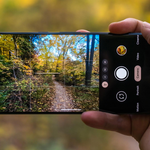
The camera is another reason to consider a Pixel phone. Image quality depends not only on camera hardware but also on software algorithms that process photos and videos. Google’s computational photography features can help users capture detailed images without having to adjust numerous settings manually.
The Pixel 10a may suit buyers who prioritize simplicity, everyday photography, and affordability. Those who need advanced zoom capabilities, more sophisticated video features, or flagship-level performance should also compare higher-end models before making a decision.
Samsung Galaxy S26: More Customization Options

Samsung Galaxy S26
Worth considering for people who want a premium phone with extensive customization and connected-device features.
Some iPhone owners appreciate Apple’s consistent interface but would like more freedom to personalize their devices. The Samsung Galaxy S26 on Amazon.com is worth exploring for this type of user.
Samsung’s One UI interface offers customization options that affect both appearance and functionality. Depending on the model and software version, these can include flexible home-screen layouts, multitasking tools, privacy features, and integration with compatible Samsung tablets, smartwatches, and other devices.
The wider ecosystem can be useful for people who want several devices to work together. However, the additional features and settings may take time to learn, especially for someone accustomed to the relatively consistent iOS interface.
The Galaxy S26 is an option for buyers seeking a premium Android experience with an advanced display and a broad selection of features. Before purchasing, compare it with other Galaxy models to determine whether the differences in size, performance, and price justify the upgrade.
OnePlus 15: For Performance and Battery Priorities

OnePlus 15
An alternative for shoppers prioritizing performance, battery life, and fast charging.
iPhone owners looking for a performance-focused Android phone may want to explore the OnePlus 15 on Amazon.com.
OnePlus uses OxygenOS, its customized version of Android. The interface differs from iOS, but the basic smartphone activities remain familiar, including messaging, media playback, app management, and customization.
Performance, charging speed, and battery capacity are important considerations when comparing OnePlus devices. However, these specifications can vary by model and market, so check the exact product listing before purchasing.
A OnePlus phone may suit people who frequently multitask, use demanding applications, or want a responsive experience for everyday activities. It is also worth checking the software-update policy, network compatibility, and included charging accessories before deciding.
Motorola: An Alternative Across Different Budgets

Motorola Android phones
A category to explore if you prefer familiar Android navigation and practical everyday features.
Motorola offers Android smartphones at several price points. Buyers can explore the Motorola Android phones available on Amazon.com to compare the available options.
Many Motorola devices offer a relatively familiar Android interface alongside additional shortcuts, gestures, and practical features. Depending on the model, these tools can make common tasks easier without requiring users to navigate through multiple menus.
Motorola may appeal to former iPhone owners who want everyday smartphone essentials without paying for every premium feature. However, its product range includes devices with different processors, cameras, displays, and software-support commitments.
Rather than choosing a phone based on price alone, compare its overall performance, battery life, camera quality, and expected software support.
Leaving iPhone: Which Services and Tools Will Change?
Moving between platforms can affect some of the services and accessories you use regularly. Fortunately, most everyday smartphone functions have alternatives on Android.
iMessage and group chats: Android does not include Apple’s iMessage service. Google Messages supports RCS messaging on compatible devices and networks, but the experience depends on carrier support, settings, and the devices used by other participants. Some conversations may work differently after switching.
iCloud Photos: Google Photos is an alternative for organizing and backing up pictures. Your existing photo library can be transferred, but the process may require preparation. Review your storage needs and backup settings before relying entirely on a new service.
FaceTime: Android users can join supported FaceTime calls through compatible browser links, although the experience is not identical to using FaceTime on an iPhone. Google Meet and other video-calling applications are additional options.
Apple Watch and accessories: An Apple Watch cannot be paired with an Android phone in the same way it pairs with an iPhone. Other accessories may work across platforms, but compatibility varies. Check your essential accessories before making the switch.
Passwords and accounts: Confirm that you can access your passwords, passkeys, contacts, authentication codes, and important online accounts. This is especially important for banking applications and accounts that require two-factor authentication.
Planning for these differences can make the transition considerably easier.
How to Switch From iPhone to Android Without Losing Your Data
Switching platforms does not mean starting with an empty phone. Google’s Android switching tools can help transfer supported information from an iPhone to a new Android device.
However, the process depends on the devices, operating-system versions, and transfer method. Some applications and types of data may require additional steps, so it is worth preparing before beginning.
Follow this checklist to make the process more manageable:
- Back up your iPhone. Confirm that your important information is backed up and that you know the passwords for your accounts.
- Review the Android setup instructions. Check the transfer process recommended for your new phone.
- Transfer supported information. Move contacts, photos, videos, calendars, and other eligible data.
- Install essential applications. Download the Android versions of your everyday apps and sign in to your accounts.
- Test important services. Confirm that messaging, email, banking, multifactor authentication, and backups work correctly.
- Keep your old iPhone temporarily. Do not erase or trade it in until you have verified that the information you need is available on the new device.
If you use iMessage, review Apple’s official instructions for deregistering your phone number when switching to a non-Apple phone. This can help prevent certain messages from continuing to be routed through Apple’s messaging service.
For detailed instructions, visit Google’s official Switch to Android guide.
The Bottom Line
iPhone owners do not need to become Android experts to make the switch successfully. The most important step is choosing a phone that matches their preferences, budget, and expectations for long-term use.
The Google Pixel 10a is worth considering for buyers who want a straightforward Android experience. The Samsung Galaxy S26 offers extensive customization and connected-device features, while the OnePlus 15 may appeal to performance-focused users. Motorola provides additional options across different budgets.
Battery life, camera quality, screen size, storage, and software-update support all deserve attention before making a purchase. A larger screen or more powerful processor is not necessarily worth the extra cost if you will not use the additional capabilities.
Instead of choosing the most expensive phone available, compare models within your budget and consider the features you rely on every day. The right Android phone should make the transition comfortable while providing the performance, usability, and support you need for years to come.
Amazon Affiliate Disclosure: As an Amazon Associate, I earn from qualifying purchases. If you click on an Amazon.com link in this article and make a purchase, I may earn a commission at no additional cost to you.