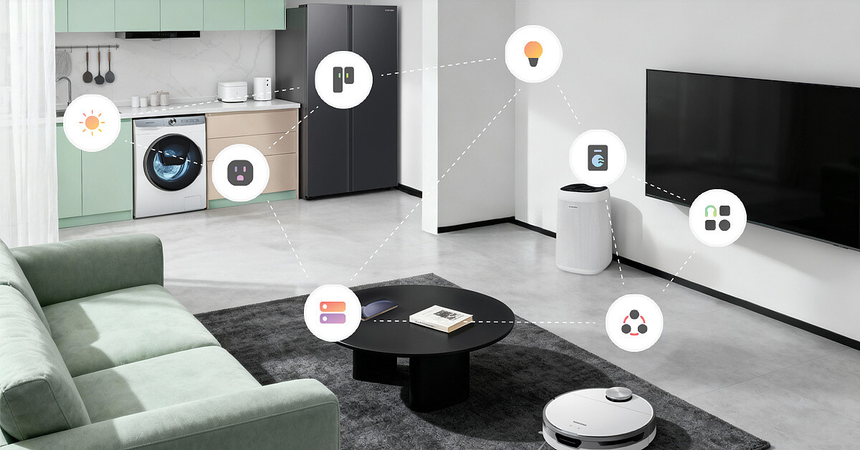
Building a smart home does not require buying a new refrigerator, washing machine, television, or air conditioner. Many existing appliances can become part of a connected home with the help of smart plugs, sensors, universal remotes, and other accessories.
The idea is to begin with the equipment already available rather than purchasing new appliances to redesign the entire home around new technology. A practical approach makes it possible to control lights, automate everyday routines, monitor electricity consumption, and manage compatible appliances through a mobile application. Some functions can be added to existing devices with accessories, while others may require new equipment.
How to Begin: Find Out What Is Already Available
Before buying new accessories or appliances, assess what is already available at home. Make a list of major appliances and other devices, such as lamps, fans, televisions, air conditioners, and coffee makers. Consider how each device operates and whether it can become part of a smart home.
For example, a table lamp controlled by a wall switch may work with a smart plug. A television operated by an infrared remote may be compatible with a smart universal remote. An older appliance that lacks internet connectivity may still benefit from compatible monitoring accessories, provided they are suitable for that device.
It is not necessary to make every device smart. Focus on the appliances that would genuinely benefit from additional functionality.
Smart Plugs Help Automate Suitable Appliances
Smart plugs are among the simplest accessories for building a smart home. They connect to compatible wall outlets and allow suitable appliances to be switched on or off remotely, according to a schedule, or as part of an automation routine.
Many smart plugs can also provide electricity consumption data and let users create schedules or automation scenarios. Before choosing a product, check its voltage and current ratings, outlet type, Wi-Fi requirements, and compatibility with your preferred smart home platform. The connected appliance must also support external power switching.
A smart plug is not suitable for every electrical device. Some appliances require a physical button press to start, while others may lose their settings or behave unpredictably after a power interruption. High-power heaters and other high-current appliances should only be connected to appropriately rated equipment when the manufacturer confirms compatibility. Refrigerators should use a reliable power supply that does not introduce unintended interruptions.
Explore smart plugs with energy monitoring on Amazon.com to compare features and compatibility.
Lights Can Become an Integrated Part of a Smart Home
Lighting is often one of the easiest areas to automate because it can provide convenience without requiring major changes to the home.
Ordinary lamps can be incorporated into a smart home using compatible smart plugs. For ceiling lights, smart switches or relays may allow remote control and scheduling, provided they are compatible with the wiring and lighting load.
Smart bulbs are another option for suitable fixtures, although they require replacing the existing bulbs. They also generally need a continuous power supply to remain connected. Turning them off using a traditional wall switch can interrupt app and voice control.
Consider which routines would be useful. Bedroom lights could turn on at a specified time in the morning, while living-room lamps could dim in the evening. Motion-activated lighting can also help illuminate hallways when someone passes through.
For renters or people who want to avoid electrical modifications, smart plugs and compatible smart bulbs may be easier to install than replacement wall switches.
Smart Hubs Can Enable the Integration of Older Appliances
Many devices can be controlled using a remote but cannot connect directly to the internet. In these cases, a smart infrared hub may allow a compatible television, air conditioner, or other remote-controlled appliance to work with a smartphone or voice assistant.
Depending on the product and appliance, users may be able to switch a television on or off or adjust an air conditioner’s temperature and operating mode.
Before selecting a hub, confirm that it supports the appliance’s remote-control system. Some products can learn commands from an existing remote, while others rely on a database of supported devices. Not all remotes use infrared; some operate through radio frequency or other communication methods.
It is also important to understand that some infrared hubs only transmit commands and cannot confirm whether an appliance received them or completed the requested action. This limitation can matter when reliable status monitoring is required.
Browse smart infrared hubs on Amazon.com to compare supported devices and control options.
Sensors Can Enable Additional Automation Opportunities
Sensors help smart homes respond to specific conditions instead of relying entirely on fixed schedules. Door and window sensors can send alerts when an entry point opens, while motion sensors can activate compatible lights. Temperature, humidity, and water-leak sensors can monitor room conditions or provide warnings about potential plumbing problems.
These accessories can help monitor environments where older appliances operate, even when those appliances do not have built-in smart features. For example, a temperature sensor can track conditions in a room with a conventional fan or air conditioner. However, the sensor alone cannot control every appliance; the required hardware and automation system must support the intended action.
A hallway motion sensor connected to a compatible smart light provides a simple example. When movement is detected, the light turns on and switches off after a specified period without activity. Once configured, the routine can operate without requiring someone to open an app every time they enter the hallway.
Consider smart motion sensors, door and window sensors, or water-leak detectors based on your home’s needs.
Choosing a Smart Home Platform That Is Compatible With Accessories
Managing several accessories through separate mobile applications can become inconvenient. A smart home platform or hub can bring compatible devices together, allowing users to manage them from one place and create automation routines involving multiple products.
Many accessories connect directly through Wi-Fi, while others use protocols such as Zigbee, Thread, or Bluetooth. Some require a compatible hub or gateway. Support for one protocol does not guarantee compatibility with every device that uses it.
Before purchasing a platform, check whether it supports your essential devices, preferred voice assistant, and required automation features. Matter compatibility can simplify connections between products from different manufacturers, but compatibility still depends on the specific devices and platform.
If only a few accessories are needed, purchasing a dedicated hub may not be worthwhile. Start with products compatible with your existing platform and consider a third-party solution only when it addresses a specific compatibility or automation problem.
Explore smart home hubs on Amazon.com to compare supported protocols and device ecosystems.
Creating Useful Automations Instead of Trying to Control Everything
The main benefit of a smart home is that compatible devices can work together. Creating a few useful routines is often more practical than trying to control every appliance through a smartphone.
Consider these simple automation scenarios:
- Morning lighting: Turn on a bedroom lamp at a chosen time.
- Leaving home: Turn off selected lights and compatible nonessential devices with one action.
- Evening routine: Switch on living-room lamps or activate a preferred lighting setting when it gets dark.
- Hallway lighting: Use a motion sensor to activate compatible lights when movement is detected.
- Energy monitoring: Check the electricity consumption of selected appliances through a smart plug with energy-monitoring capabilities.
Keep automation routines simple at first. A single action should not depend on numerous devices unless that complexity provides a clear benefit.
It is also important to consider what happens if the internet connection is interrupted. Some smart home accessories continue to operate locally, while others depend on cloud services for control or automation. Check the manufacturer’s documentation to understand which functions remain available offline.
Making the Most of Electricity Consumption Data Even With Older Appliances
Monitoring electricity consumption can be more cost-effective than replacing every older appliance with a newer model. Smart plugs with energy-monitoring features can help identify how much electricity compatible connected devices consume.
This information may help users understand usage patterns and decide whether changing schedules or habits could reduce unnecessary consumption. However, the readings usually represent only the appliance connected to the individual smart plug.
For a broader picture of household electricity use, a compatible whole-home energy monitor may be necessary. These products can require installation inside the home’s electrical distribution panel, which should be handled by a qualified electrician when required.
Electricity monitoring does not reduce consumption on its own. Any potential savings depend on the appliances being monitored, usage patterns, the accuracy of the measurements, and the actions taken based on the results.
Compare energy-monitoring smart plugs on Amazon.com to review available features and compatibility.
Making Sure That Security and Privacy Are Taken Into Account
Every new smart accessory may introduce additional accounts, applications, and potential security risks. Careful planning can help reduce these risks.
Use unique passwords for smart home accounts and enable multifactor authentication wherever available. Install firmware updates, remove inactive accessories from accounts, and grant third-party applications only the permissions they need.
A separate guest or Internet of Things (IoT) network may help isolate connected devices if your router supports it. However, network separation can affect communication between devices, so check compatibility before changing network settings.
Review privacy options for cameras, voice assistants, and other devices that collect information about activity inside the home. Understand whether a product uses cloud processing, what information it stores, and how that data is handled.
Avoid relying entirely on smartphone applications or voice assistants to operate essential equipment. Keep manual controls available wherever possible and ensure that critical appliances can still be operated safely if the smart home system becomes unavailable.
Building a Smart Home Step by Step, One Accessory at a Time
Purchasing accessories gradually can help prevent unnecessary spending and make it easier to identify which features are genuinely useful.
1. Make devices controllable. Start with one smart plug or smart lighting accessory. Test its scheduling, manual operation, and connectivity in the intended location.
2. Make devices responsive. Add a sensor or smart universal remote to address a specific inconvenience, such as controlling an older air conditioner or automatically activating a light.
3. Make devices work together. If you have compatible accessories from different manufacturers, consider a smart home platform or hub that can bring them together.
4. Create useful automation routines. Build a few routines around everyday activities. Keep manual controls available and test how the system behaves when internet access becomes unstable.
Following these steps can reduce the risk of purchasing incompatible equipment or spending too much time managing multiple applications.
Final Thoughts
Building a smart home does not require a substantial investment or replacing appliances that still work well. Smart plugs, lighting controls, universal remotes, sensors, and a compatible smart home platform can add useful features to many existing devices.
The best approach is to identify a specific problem and choose an accessory that can solve it. Before buying anything, check electrical ratings, appliance behavior after a power interruption, network requirements, and privacy settings.
Start with a small number of accessories and expand only when the next addition offers a clear benefit. With careful planning, you can create a more convenient and connected home while continuing to use your existing appliances for as long as they remain safe and functional.
Amazon Affiliate Disclosure: As an Amazon Associate, I earn from qualifying purchases. If you click on an Amazon.com link in this article and make a purchase, I may earn a commission at no additional cost to you.