A 5G connection may seem fast in one location and slow down after a short drive. You might enjoy quick downloads in a city but experience slower speeds or a weaker signal in a small town. This can make it difficult to predict what T-Mobile coverage will be like.
Your experience depends on more than whether your phone displays a 5G indicator. The type of 5G available in your area, your distance from a cell site, local network traffic, and your phone’s hardware can all affect performance.
If you’re considering T-Mobile or already use the carrier, understanding how its 5G coverage compares between cities and small towns can help you make a more informed decision.
How to Begin: T-Mobile’s Coverage Map
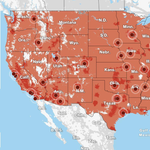
The T-Mobile coverage map is a good place to start. Enter a specific address or ZIP code to check the reported availability of 4G LTE and 5G coverage.
Instead of looking only at your home, check your workplace, nearby shopping centers, commute route, and the smaller towns and communities you visit regularly.
Remember that T-Mobile’s map estimates outdoor coverage and may not accurately reflect reception inside buildings.
T-Mobile’s 5G network also includes two main service categories: 5G Extended Range, which uses low-band spectrum to provide broader coverage, and 5G Ultra Capacity, which uses mid-band and, in some locations, millimeter-wave technology to deliver higher-capacity service.
1. T-Mobile 5G in Big Cities
Big cities have many people relying on their phones throughout the day. Their concentrated populations can make it practical for carriers to deploy additional network capacity, but living in a large city doesn’t guarantee a consistently strong connection, particularly indoors or underground.
In areas with T-Mobile 5G Ultra Capacity, a compatible phone may deliver faster downloads and better data performance than it would on a lower-band connection.
This can make a difference when streaming movies, downloading photos and videos, making video calls, or using your phone as a mobile hotspot.
However, cellular coverage in a city isn’t always straightforward. Skyscrapers, underground parking garages, elevators, and other enclosed spaces can interfere with reception.
Busy shopping districts, sports stadiums, train stations, and concert venues may also experience network congestion, especially during peak hours when many people are connecting simultaneously.
When evaluating T-Mobile 5G coverage in a large city, focus on the locations you use every day rather than relying solely on a neighborhood-wide coverage estimate.
If you primarily use your phone outdoors, the city’s coverage map may provide a useful starting point. If you spend most of your time inside an office building, reception inside that specific building matters much more.
2. What About Small Towns and T-Mobile 5G?
Small towns tend to be more spread out than big cities, and the distance between cellular sites can be greater. This is where T-Mobile’s 5G Extended Range network can be particularly useful. Its lower-frequency spectrum can cover broader areas than higher-frequency signals under comparable conditions.
That doesn’t mean every small town will have equally strong reception.
You may find reliable 5G around the downtown area but weaker signals on the outskirts or along nearby highways. A road through a valley or a sparsely populated region may also have fewer nearby cellular sites.
Local terrain and infrastructure can affect reception, particularly in hilly areas or locations where network upgrades have not been completed.
If you live in a small town, check the coverage map for your specific home or apartment rather than assuming that service in the downtown business district will extend to your address.
Also consider the other places you visit regularly, including restaurants, workplaces, shopping areas, and medical offices.
3. What’s the Difference Between T-Mobile’s Two 5G Varieties?
T-Mobile’s 5G Extended Range and 5G Ultra Capacity serve different purposes. Extended Range focuses on broader geographic coverage, while Ultra Capacity is designed to provide higher-capacity data service where available.
| Feature | 5G Extended Range | 5G Ultra Capacity |
|---|---|---|
| Primary purpose | Broader coverage | Higher-capacity data service |
| Spectrum | Low-band | Primarily mid-band, with millimeter wave in some locations |
| Main advantage | Can reach more widely dispersed areas | Can provide faster data speeds where available |
| Coverage pattern | Generally broader | Availability can be more localized |
| Important consideration | Speeds vary by location | Signal and performance depend on local conditions |
Low-band 5G generally offers broader reach, while mid-band and higher-frequency technologies can provide greater capacity and speed under suitable conditions.
Neither type guarantees the same performance everywhere. Network congestion, signal obstructions, your device, and your distance from a cell site can all influence the connection.
If you’re comparing coverage in cities and small towns, Extended Range is particularly relevant because it can provide service across more widely dispersed areas. Ultra Capacity may offer higher data rates where the network supports it.
For the most useful comparison, check the coverage map for your regular locations instead of assuming that a particular network label guarantees a specific speed.
4. Does T-Mobile’s 5G Become Slower When You Leave the City?
It can, but that’s not always the case.
In an urban environment, your phone may have access to strong signals and nearby cell sites that support higher data speeds. In a less populated area, it might connect to a different 5G layer, experience weaker reception, or encounter gaps in coverage.
Your phone’s capabilities also matter. An older device may not support every 5G band used by T-Mobile, which can affect the service available to you.
On the other hand, a smaller community with good coverage and relatively low network traffic may deliver a better experience than a crowded city during a major event.
Population size alone does not determine connection quality.
If you want a realistic comparison, test the network in both environments. Load web pages, stream video, or make a video call in each location. If you use a speed-testing application, run multiple tests rather than relying on one measurement.
Download speeds are important, but a stable connection for calls, messaging, and navigation may be more valuable than a brief burst of high-speed data.
5. How to Check T-Mobile’s 5G Coverage Before Switching
If you’re considering switching to T-Mobile, start by checking the coverage map for your home address. If you live outside a major metropolitan area, review the surrounding roads and residential communities as well.
Next, check your workplace. If possible, test reception inside the rooms where you spend most of your working day, not just outside the building.
Review coverage along your commute and at other places you visit frequently. This is especially important if you regularly drive between cities and smaller communities.
Testing a Phone
Ask a friend or family member if you can try their T-Mobile phone. This can give you a better idea of what to expect from the network.
Test calls, texts, browsing, and the applications you use most often. Repeat the tests in different locations and at different times of day to get a more realistic picture of performance.
Comparing Other Carriers
If reliable cellular coverage is essential, compare T-Mobile with competing networks using the same locations and similar testing conditions.
T-Mobile may provide good service at home but weaker reception at your workplace or along your regular travel routes. Conversely, another carrier may perform better in one location but worse in another.
Real-world performance can vary according to your device and local network conditions, so don’t rely exclusively on a coverage map.
T-Mobile also provides information about trying its service through its official website. Check the current eligibility requirements and terms before committing to a trial or switching your primary number.
6. My Phone Says 5G, but It’s Not Fast. Why?
Your phone’s 5G indicator doesn’t guarantee that you’ll receive high speeds at every moment.
Several factors can affect your connection:
- Weak signal: You may be near the edge of a coverage area.
- Network congestion: Many active users can reduce available capacity.
- Indoor obstacles: Walls, large buildings, and certain types of glass can weaken reception.
- Device limitations: Your phone may not support every 5G band used by T-Mobile.
- Background activity: Applications, updates, and cloud backups may consume bandwidth.
- Temporary network issues: Local maintenance or outages can affect performance.
- Network switching: Your phone may move between different network technologies as conditions change.
Check your phone’s specifications to confirm that it supports the relevant network bands.
You can also try loading a website or making a video call in another location, or moving closer to a window if you’re indoors. Make sure your phone has the latest available software updates.
If the connection remains unreliable across multiple locations, contact your carrier to investigate the issue.
7. How Should You Prepare If You Frequently Drive Between Cities and Small Towns?
If you regularly travel between large cities and smaller communities, check coverage along your route rather than focusing on a single destination.
Your journey may include strong 5G coverage, areas where your phone switches to 4G LTE, and stretches with little or no cellular reception.
Before leaving, review the coverage map and download offline maps for the areas you plan to visit. Save important addresses and travel details so you can access them without an internet connection.
You may also want to carry a car charger or portable battery pack for longer journeys. If you need a portable charging option, you can browse USB-C power banks on Amazon.com and compare products compatible with your phone.
A power bank won’t improve cellular signal strength, but it can help keep your phone powered for navigation and communication.
If you’re traveling through particularly remote areas, avoid relying on cellular data as your only navigation resource. Prepare for the possibility of losing service along the way.
8. Can I Use T-Mobile’s 5G Instead of Home Internet in a Small Town?
Cellular data can be useful as a backup if your home internet connection becomes unavailable. However, smartphone 5G coverage does not automatically mean T-Mobile’s home internet service is available at your address.
Check T-Mobile’s home internet offerings to review availability and equipment requirements for your location.
Consider how many people and devices will use the connection at the same time. A service that works well for occasional browsing may perform differently when several people are streaming videos, attending online meetings, or downloading large files.
Before replacing an existing broadband connection with cellular internet, compare the available options and consider your household’s needs.
Final Thoughts
T-Mobile’s 5G coverage can differ between cities and small towns, but population size alone doesn’t determine how well your phone will perform. Cities may offer access to higher-capacity 5G in certain locations, while Extended Range 5G helps provide broader coverage across smaller communities and rural areas.
Actual signal strength and performance still depend on your address, device, network conditions, and surroundings.
Start by checking T-Mobile’s coverage map for your home, workplace, and regular travel routes. If possible, test the service in person before switching carriers.
The most useful comparison isn’t simply between cities and small towns. It’s whether T-Mobile delivers reliable calls, useful data speeds, and consistent connectivity in the places where you need your phone most.
Amazon Affiliate Disclosure: As an Amazon Associate, I earn from qualifying purchases. If you click on an Amazon.com link in this article and make a purchase, I may earn a commission at no additional cost to you.