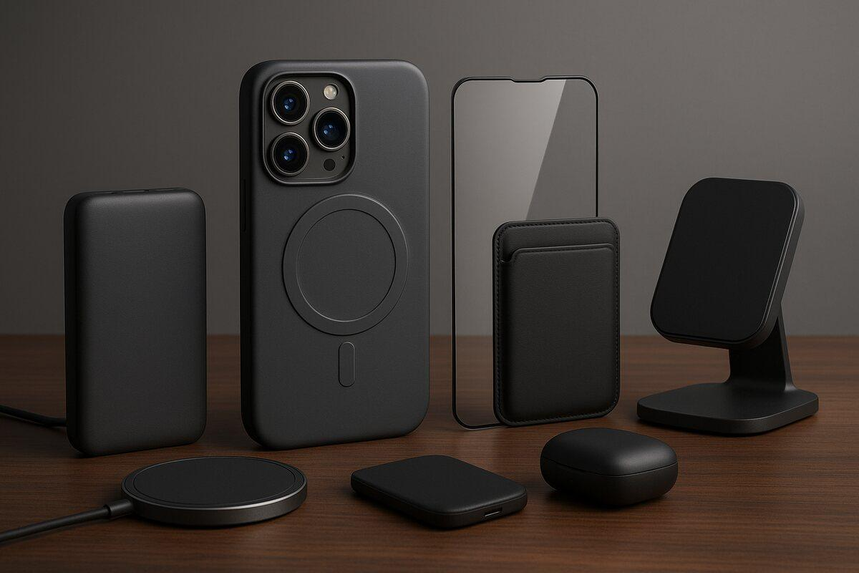
Smartphones are a ubiquitous part of modern life, but the accessories that make them more convenient rarely receive the same attention as the devices themselves. While a new phone may offer impressive features, a few practical accessories can often make a bigger difference to everyday use.
A wireless charging stand keeps a phone within easy reach, a power bank provides backup when the battery runs low, and a comfortable grip makes larger phones easier to handle. Even a simple cable organizer can prevent the frustration of tangled cords in a backpack or on a desk.
These accessories do not necessarily introduce groundbreaking technology. Instead, they improve familiar tasks and remove small inconveniences from daily routines. Here are 11 smartphone accessories worth considering if you want to make everyday phone use more comfortable and organized.
1. A Wireless Charging Stand That Lets You See the Time
A phone lying flat on a desk can be difficult to check at a glance. Raising it on a stand makes it easier to view the time, read notifications, and answer calls without repeatedly picking it up. When the stand supports wireless charging, it can also keep the phone powered throughout the day.
A charging stand can be useful on a home-office desk, bedside table, or kitchen counter. Some models support both portrait and landscape orientations, while others are designed for particular wireless charging standards.
Before buying one, check whether your phone supports the stand’s charging technology and whether your case affects charging performance. Metal components or excessive case thickness can interfere with some wireless charging setups.
A stand can also simplify the charging routine by reducing the need to connect and disconnect a cable every time you use the phone. For many people, that convenience is more valuable than having an especially fast charger they rarely need.
Explore wireless phone charging stands on Amazon.com.
2. A Compact Power Bank for When the Day Lasts Too Long
Battery problems rarely happen at convenient times. A phone might run low while navigating an unfamiliar city, waiting at an airport, attending an outdoor concert, or using mobile data throughout a busy workday.
A portable power bank provides backup power without requiring access to a wall outlet. The best option is not necessarily the largest or most feature-packed model. It should be compact enough to carry regularly and practical enough that you remember to recharge it.
For everyday use, a smaller power bank may provide enough capacity to top up a phone during a commute or lunch break. Frequent travelers and people who rely heavily on navigation may prefer a higher-capacity model that can provide multiple charges, depending on the phone’s battery size and charging efficiency.
Consider the power bank’s weight, capacity, output wattage, and port compatibility. USB-C models can be particularly convenient for phones that support USB-C charging. Air travelers should also check their airline’s current rules for carrying portable batteries.
Compare compact USB-C power banks on Amazon.com.
3. A Phone Grip for Better One-Handed Use
Smartphones have become larger over the years, making their displays better for reading and watching videos but sometimes harder to operate with one hand. Reaching across the screen with a thumb can be uncomfortable, particularly when using a larger device outdoors.
A phone grip adds a more secure holding point to the back of a phone or its case. Depending on the design, it may also work as a small stand for watching videos or making video calls.
Expandable grips provide extra space for your fingers, ring grips allow a finger to slide through a loop, and flat adhesive grips offer a low-profile alternative. The best design depends on how you hold your phone and how much additional bulk you are comfortable carrying.
Check compatibility with your phone case and wireless charging setup before purchasing. Some grips must be removed before charging, while others work with specific magnetic accessories.
A phone grip can be especially useful for people who frequently take photos, read on their phones, or use large devices while commuting.
Browse phone grips and ring holders on Amazon.com.
4. A Braided Charging Cable That Can Handle Daily Use
Charging cables often experience wear around their connectors because they are plugged in, unplugged, bent, and carried around repeatedly. Since a cable may be used several times a day, its construction and durability matter more than its appearance.
A braided cable has an outer woven layer that can help resist everyday abrasion. Reinforced connector ends may also improve durability, although no cable is completely protected against damage from excessive bending or pulling.
Length is another practical consideration. A shorter cable can help keep a desk organized when the charger sits beside the phone, while a longer one may be more convenient near a bed or sofa. Choosing an appropriate length also reduces excess cable that might snag on nearby objects.
Compatibility matters just as much as construction. Check the connector type and charging specifications supported by your phone and power adapter. If you plan to transfer photos or videos between devices, verify the cable’s data-transfer capabilities as well.
Explore durable USB-C charging cables on Amazon.com.
5. A Small Cable Organizer for Bags and Desks
Carrying an extra charging cable is useful, but loose cables can quickly become tangled with headphones, keys, notebooks, and other belongings. The same problem can occur on a desk where several charging accessories share limited space.
A cable organizer keeps cords in place without requiring much room. Silicone clips can hold a cable along the edge of a desk, while reusable hook-and-loop ties keep cables bundled together. Small zippered pouches are useful for carrying a charger, power bank, headphones, and spare cables while traveling.
The right option depends on where you use your accessories. Someone who charges a phone at a desk may only need a few adhesive clips. A frequent traveler might prefer a pouch with separate compartments for different items.
Keeping a spare cable in a designated place also makes it easier to find when your phone needs charging away from home.
Compare cable organizers and travel pouches on Amazon.com.
6. A Privacy Screen Protector for Public Transportation and More
Phones are often used in places where other people can easily see their screens. Checking work emails, reading private messages, or entering personal information on a crowded bus or train can feel uncomfortable.
A privacy screen protector uses a special filter to narrow the viewing angle. The display remains easier to see from directly in front, while people looking from the sides may see a darker or less readable screen.
This type of protector can be useful on public transportation, in shared offices, and in other crowded environments. However, privacy filters can reduce screen brightness and sometimes affect clarity or touch responsiveness.
Fit is also important. The protector should match the phone’s screen dimensions and accommodate its sensors, camera openings, and other design features.
A privacy screen protector only helps limit casual viewing from nearby people. It does not prevent physical theft, secure an unlocked phone, or protect information shared through insecure apps.
Find smartphone privacy screen protectors on Amazon.com.
7. A Car Phone Mount That Makes Navigation Simpler
Navigation apps are useful for daily commutes and unfamiliar routes, but checking directions can become distracting when a phone is not positioned properly. A suitable car mount keeps the device stable and places the screen within a convenient viewing area.
Magnetic mounts are popular because they make attaching and removing a phone relatively simple. Depending on the model, they may attach to a dashboard, windshield, or air vent. Some also include wireless charging.
Before purchasing a mount, verify that it works with your phone and case. Certain models require a compatible magnetic case or an additional metal ring. Magnetic attachment alone does not guarantee compatibility with magnetic wireless charging.
Placement is equally important. The mount should not obstruct the driver’s view, interfere with vehicle controls, or sit in an area where it could affect an airbag. Follow the manufacturer’s installation instructions and set up navigation before starting the journey.
Explore magnetic car phone mounts on Amazon.com.
8. A Bluetooth Tracker for Keys, Wallets, and More
Phones are not the only belongings that get misplaced. Keys, wallets, backpacks, and small travel bags can disappear from view just when they are needed most.
A Bluetooth item tracker can make these belongings easier to locate through a compatible smartphone app. Depending on the model, you may be able to make the tracker play a sound, view its last known location, or use a broader network of nearby devices to help find it.
Compatibility should be checked before buying. Some trackers work particularly well with Apple’s Find My network, while others are designed for Android or rely on a manufacturer’s own tracking service. Location features and tracking range vary between products.
A tracker is useful for locating everyday items, but it cannot guarantee the recovery of stolen property. Battery replacement, subscription fees, privacy features, and the availability of a location-finding network are all worth considering.
Compare Bluetooth trackers for keys and bags on Amazon.com.
9. A Screen-Cleaning Kit for Touchscreens
Touchscreens collect fingerprints, skin oils, dust, and other marks throughout the day. These smudges can make a display look less clear, particularly in bright sunlight or under indoor lighting.
A screen-cleaning kit typically includes a microfiber cloth and may also contain a cleaning solution formulated for electronic displays. A small cloth is easy to keep in a laptop bag or travel pouch, making it available whenever the screen needs attention.
Not every household cleaner is suitable for phone displays. Some products can damage protective coatings, while abrasive materials may scratch the screen. Follow the phone manufacturer’s cleaning recommendations, and avoid allowing liquid to enter charging ports or other openings.
For most people, a clean microfiber cloth is a practical starting point. A dedicated cleaning kit may be worthwhile for those who frequently use their phones for photography, navigation, or video calls.
Browse microfiber phone screen-cleaning kits on Amazon.com.
10. A Small USB-C Adapter for Older Accessories
Newer phones and accessories may use connectors that are incompatible with older equipment. This can be inconvenient when you still have useful wired headphones, storage devices, card readers, or other accessories that use a different connection.
A USB-C adapter can help connect compatible accessories to a phone with a USB-C port. Depending on its design, it may support wired audio, file transfers, or connections to external storage devices and card readers.
The important consideration is compatibility. An adapter that physically fits may not support every feature you need. Some audio adapters require a built-in digital-to-analog converter, while USB accessories may need support for specific data standards. Certain phones may also restrict particular accessory functions.
Identify the device you want to connect before purchasing an adapter. A single model that meets a specific need can be more useful than buying several inexpensive adapters that may not work as expected.
Explore USB-C phone adapters on Amazon.com.
11. A Bedside Phone Stand to Replace the Chaotic Cable Setup
Phones are often charged in bedrooms, where cables can slip behind furniture or become tangled with other belongings. A simple bedside stand gives the phone a consistent place to rest and keeps it easier to reach.
Unlike a charging stand, a standard phone stand does not need built-in electronics. It can hold the device at a comfortable angle for checking the time, reading, or viewing a recipe before going to bed.
Look for a stable base, a suitable viewing angle, and enough clearance for the charging cable to reach the phone’s port. If you use a protective case, make sure the stand can accommodate the added thickness.
A bedside stand is a small addition, but it can help make a nightstand more organized and prevent the phone from being buried beneath other items.
Find adjustable bedside phone stands on Amazon.com.
Which Phone Accessories Are Actually Worth Buying?
The most useful accessories depend on the inconveniences you experience regularly. There is no need to buy every item on this list, especially if some would rarely be used.
If battery life is your main concern, a power bank may offer more value than a charging stand or phone grip. For a cluttered workspace, a charging stand and cable organizer can make a noticeable difference. A grip may improve comfort when using a large phone, while a privacy screen protector or Bluetooth tracker could be more useful for someone who commutes frequently.
It is also worth checking what you already own before making additional purchases. An extra cable, an old stand, or a small storage pouch might solve the problem without adding another item to your collection.
Before ordering, verify compatibility with your phone model, case, charging system, and operating system. Recent customer reviews can also help identify potential problems, particularly with accessories that depend on exact dimensions or technical specifications.
The best phone accessories are often the least exciting. They do not need to introduce new technology or promise dramatic improvements. Their value lies in making everyday tasks easier, keeping essential items organized, and reducing small frustrations that would otherwise repeat throughout the day.
Amazon Affiliate Disclosure: As an Amazon Associate, I earn from qualifying purchases. If you click on an Amazon.com link in this article and make a purchase, I may earn a commission at no additional cost to you.