A new phone’s features can feel impressive during its first week. The animations are smooth, the home screen looks fresh, and every feature seems to work as advertised. The real test begins months later, when storage fills up, notifications become overwhelming, apps request more permissions, and the manufacturer releases major software updates.
This is where Samsung and OnePlus become worth comparing. Samsung’s One UI offers a wide range of features, productivity tools, and connected-device compatibility. OnePlus designs OxygenOS to deliver a fast, fluid interface with its own customizations and shortcuts.
Neither interface is automatically better for everyone. A feature-rich phone can become frustrating if its owner spends too much time managing settings, while a streamlined interface may feel limited to someone who wants greater control.
For this comparison, we’ll focus on the Samsung Galaxy S25 and OnePlus 13. Both are flagship smartphones with software experiences that can evolve through updates. Features and availability may vary by software version, region, and device configuration.
The goal is not to decide which interface looks better out of the box. It’s to examine which software experience is more satisfying after a year of regular use.
One UI vs. OxygenOS: What Daily Use Feels Like
Samsung One UI
One UI is designed for people who appreciate having plenty of customization options. Depending on the device and software version, users can personalize the home screen, lock screen, quick settings, notifications, and other parts of the interface.
This flexibility is useful for people who want their phone to match specific work habits or personal preferences. However, having more options can also mean spending additional time configuring settings or finding particular features.
OnePlus OxygenOS
OxygenOS emphasizes a fluid interface, accessible customization options, and tools for everyday tasks. Users can adjust home-screen layouts, widgets, icons, and other interface elements without necessarily exploring as many settings.
It is not a bare-bones version of Android. OxygenOS has its own features, behaviors, and quirks that new users may need time to understand.
The key difference is not simply complexity. Samsung places greater emphasis on extensive control, while OnePlus offers a different balance between customization and everyday convenience.
The Six-Month Test: Do the Features Actually Matter?
A phone’s usefulness becomes clearer when its features reduce the effort required to complete everyday tasks. These are the areas where One UI and OxygenOS can feel different over time.
1. Customization Without Constant Tinkering
Samsung offers extensive ways to customize the interface. Depending on the device and One UI version, users can organize the home screen, adjust widgets, personalize the lock screen, and modify quick settings.
OnePlus also provides customization options for home screens, icons, widgets, and other interface details. Both systems allow users to make the phone feel more personal, although the available controls and implementation differ.
Customization becomes especially useful when it helps separate work and personal apps, organize frequently used tools, or make important shortcuts easier to access.
Notifications and quick settings also matter. Android allows users to control many notification behaviors, but finding the appropriate setting may require some exploration.
Samsung is worth considering if you want extensive control over how the phone looks and behaves. OnePlus may suit you if you want to personalize your device without spending as much time fine-tuning every detail.
There is a potential downside to both approaches: customization can become an activity in itself. Repeatedly rearranging icons, experimenting with launchers, and testing widgets may consume time without making the phone meaningfully more useful.
The practical choice depends on how much control you want and how often you expect to change your setup.
2. Notification Management and Quick Settings
After months of use, notifications can become one of the most frustrating parts of a smartphone. Shopping apps, social networks, work email, messaging services, and promotional alerts all compete for attention.
One UI provides a range of notification controls and quick-setting options. OxygenOS also offers tools to manage alerts and customize access to frequently used controls.
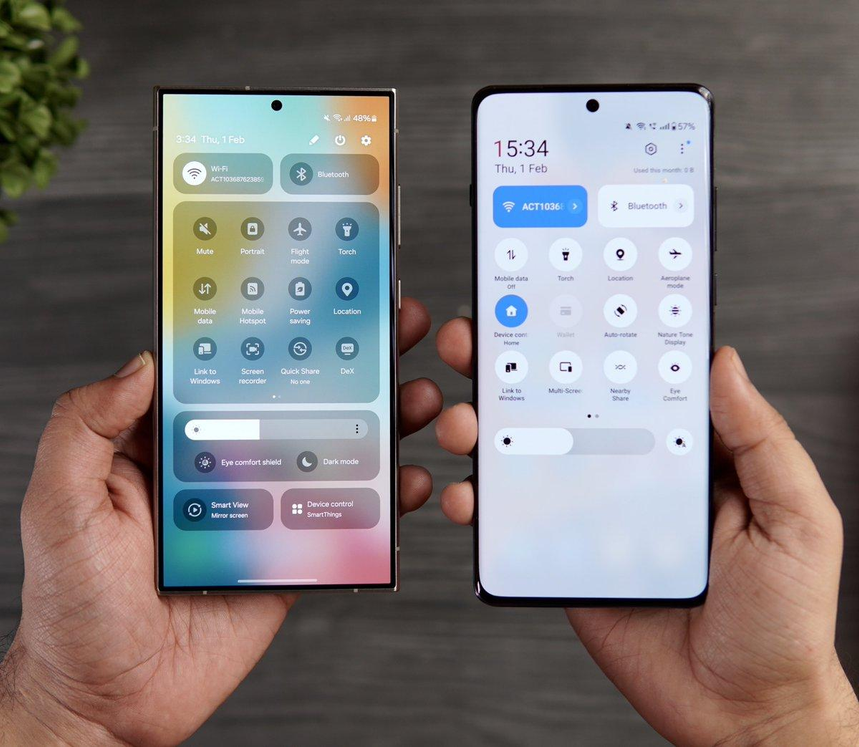
Instead of comparing screenshots, consider how easily each interface lets you complete these tasks:
- Silence promotional notifications without missing important messages.
- Manage notification categories for individual applications.
- Control which apps can send alerts or request particular permissions.
- Place frequently used settings where they are easy to reach.
- Keep notification behavior consistent without repeatedly adjusting settings.
These controls also have privacy and security implications. Reviewing app permissions and limiting unnecessary access can help you maintain better control over your information.
The more satisfying interface is the one that lets you manage distractions efficiently and then get back to what you were doing.
3. Multitasking and Productivity
Samsung has a substantial set of multitasking and productivity tools. Depending on the device and software version, supported features may include Multi Window, pop-up app windows, and Samsung DeX, which provides a desktop-like experience on compatible hardware.
These tools can be useful when referring to a document while messaging, comparing information across apps, or connecting a compatible phone to a larger display.
OnePlus also provides multitasking features, although the available tools and their implementation vary across devices. Features such as Open Canvas are particularly associated with OnePlus’s multitasking approach on supported devices, and availability should be checked for the specific model.
Not everyone needs advanced multitasking. If your daily routine mainly involves browsing, messaging, maps, and music, the additional tools may have little impact on your experience.
However, if you frequently switch between work applications or need to view multiple tasks together, Samsung’s productivity features may be especially useful. OnePlus can still meet many everyday needs without requiring users to rely on every available multitasking option.
Before buying either phone, check whether the apps you use most often work with the multitasking features you want.
What Happens as the Software Ages?
Software support becomes more important as a phone gets older. A device may still have capable hardware, but losing security updates or major Android upgrades can make long-term ownership less appealing.
An extended support commitment is valuable, although it does not guarantee that every update will arrive immediately or that every software change will improve the experience.
Samsung’s Software Update Commitment
Samsung announced that the Galaxy S25 series would receive seven generations of operating system upgrades and seven years of security updates from its global launch.
This is a substantial commitment for people who prefer to keep their phones for several years rather than replace them frequently.
However, support policies differ across Samsung’s product range. Not every Galaxy A-series or S-series device necessarily receives the same duration of support. Actual rollout schedules can also vary by model, country, and carrier.
Before purchasing, check the published policy for the exact phone you intend to buy.
OnePlus’s Software Update Commitment
The OnePlus 13 has a shorter major Android upgrade commitment than the Galaxy S25, although OnePlus has also committed to an extended period of security support for this model.
The difference may be less important to people who replace their phones every two or three years. It can become a more significant consideration for someone who wants to keep a flagship device for five years or longer.
It is important to distinguish between major Android upgrades and security updates. They serve different purposes, and a phone may continue receiving security patches after its major operating system upgrades have ended.
Update schedules and policies can change, so confirm the current support details for the exact model and region before making a purchase.
Can a Software Update Make an Older Phone Feel New?
Sometimes. An update may introduce useful features, improve existing tools, and fix bugs. It can also change familiar menus or introduce features that some users do not need.
Performance concerns are worth considering, too. An older phone may have less available storage, aging battery capacity, or applications that require more resources than they did when the device was new.
Before installing a major update, back up important data and ensure that sufficient storage is available. After installation, allow the device time to finish background optimization.
If the phone suddenly runs hotter or drains its battery faster, investigate the cause before assuming that the update has permanently damaged its performance. Temporary background activity, app behavior, and other factors can contribute to these symptoms.
For this comparison, Samsung’s published support commitment gives the Galaxy S25 a clear advantage for long-term software coverage. However, support duration alone cannot guarantee that an interface will remain satisfying to every user.
AI Features: Useful Assistant or Another Menu to Ignore?
Artificial intelligence is becoming a larger part of smartphone software, but a long list of AI features does not necessarily translate into a better everyday experience.
Samsung’s Galaxy AI tools can support tasks such as writing assistance, summarization, and image editing. Availability depends on the feature, device, language, region, and account requirements.
OnePlus has also integrated AI-powered tools into its software experience. The available features depend on the phone and installed software version.
The practical value of these tools comes down to whether they solve problems you regularly encounter.
For example:
- If you frequently work with lengthy notes, summarization tools may save time.
- If you regularly edit photographs, AI editing features may be useful.
- If you rarely use these functions, their presence may have little effect on your satisfaction with the phone.
Before buying, identify the specific AI features you expect to use and verify that they are available on your chosen device. Do not assume that every advertised feature works in every country or language.
Battery Life, Storage, and Performance After a Year
Software influences how a phone feels, but it is only one part of long-term performance.
Battery aging, available storage, application behavior, software updates, and personal usage habits all play a role. A phone may feel exceptionally smooth when new but become less convenient if its storage is nearly full or many background applications are consuming resources.
Neither One UI nor OxygenOS can eliminate normal battery aging.
Samsung After a Year
One UI provides tools to review battery usage, manage applications, and check storage. These controls can help identify apps that consume significant power or occupy space unnecessarily.
Some users may want to restrict background activity or reduce unnecessary notifications as their usage habits change. Samsung’s additional features can help with these tasks, although the precise options depend on the device and software version.
Having more features does not automatically mean worse battery life or slower performance. The effect depends on how those features and applications are used.
OnePlus After a Year
OxygenOS also provides tools for managing applications, storage, and battery usage. Its fluid animations can contribute to a responsive feel, but smooth animations alone do not prove that battery life or performance will remain exceptional over time.
For either brand, keeping storage reasonably clear, reviewing background activity, and removing unnecessary applications can help maintain a more convenient experience.
A Simple Phone Maintenance Routine
Every few months, consider these tasks:
- Install available security updates.
- Review which applications consume the most battery power.
- Remove apps you no longer use and clear unnecessary files.
- Review app permissions and background activity.
- Back up important photos and documents.
- Restart the phone if minor software problems persist.
These habits can do more for long-term satisfaction than repeatedly changing interface animations or rearranging the home screen.
Samsung Galaxy S25 vs. OnePlus 13: Which Should You Consider?
Samsung Galaxy S25
Best suited to: People who want extensive customization, additional productivity tools, and a long published software-support commitment.
Potential downside: One UI’s range of features and settings may feel overwhelming to users who prefer a simpler setup.
Find the Samsung Galaxy S25 on Amazon.com
OnePlus 13
Best suited to: People who prefer OxygenOS’s interface and customization approach, along with the features offered by the OnePlus flagship range.
Potential downside: Its major operating system upgrade commitment is shorter than the Galaxy S25’s, which matters to people planning to keep their phone for many years.
Find the OnePlus 13 on Amazon.com
These links lead to Amazon.com search results rather than verified listings for individual products. Before purchasing, check the seller, specifications, storage capacity, network compatibility, return policy, and current availability.
Small Accessories That Can Make Long-Term Phone Ownership Easier
Accessories do not determine whether One UI or OxygenOS is better, but a few practical purchases can make everyday ownership more convenient.
USB-C Wall Charger
An additional charger can be useful for work, travel, or keeping one in another room. Check the charging standards supported by your phone, since a charger’s advertised maximum wattage does not guarantee that the device will use that full output.
Browse USB-C chargers on Amazon.com
Protective Phone Case
A suitable case can help protect a phone from scratches and some everyday impacts. Choose one designed for the exact model so that the buttons, ports, and cameras remain accessible.
Browse Samsung Galaxy S25 and OnePlus 13 cases on Amazon.com
Neither accessory changes the phone’s software behavior, but both may be useful for people who intend to keep their device for several years. Check model compatibility and current product details before buying.
Everyday Frustrations That Can Help You Decide
If you are unsure which interface suits your habits, consider the problems you want to avoid.
| Your priority | What to consider |
|---|---|
| Spending less time searching through settings | Try OxygenOS and see whether its layout suits you. |
| Having more options for personalizing the phone | Explore One UI’s customization tools. |
| Keeping the phone for many years | Compare the exact software-support policies; the Galaxy S25 has the longer commitment in this comparison. |
| Switching between apps for work | Test Samsung’s multitasking features and the alternatives available on the OnePlus 13. |
| Reducing unnecessary notifications | Try the notification controls on both devices. |
| Keeping familiar menus and habits | Review the interface and update changes before choosing. |
These are guidelines rather than universal rules. An experienced Android user may find One UI straightforward, while a beginner may find its options overwhelming. Similarly, OxygenOS will not necessarily feel simpler to every user.
Frequently Asked Questions
Is Samsung One UI better than OnePlus OxygenOS?
One UI is worth considering if you want extensive customization and productivity features. OxygenOS may suit you better if you prefer its interface and approach to everyday tasks. The right choice depends on which features you actually use.
Which phone receives software updates for longer?
In this comparison, Samsung has the longer published commitment for the Galaxy S25: seven generations of operating system upgrades and seven years of security updates. The OnePlus 13 has a shorter major-upgrade commitment and a published security-support period of its own. Check the current policy for your region before purchasing.
Does OnePlus slow down after a year?
There is no basis for saying that every OnePlus phone slows down after a year. Performance depends on hardware, battery condition, available storage, app behavior, software, and usage habits. The same factors affect Samsung phones.
Is Samsung software too complicated?
One UI offers many features and settings, which can feel overwhelming to some users. Others appreciate being able to customize more aspects of the phone. Trying the interface before buying can help you decide.
Is OxygenOS closer to stock Android?
OxygenOS is not stock Android. It has its own design, customization options, system features, and behaviors, even though it shares Android’s underlying platform.
Which is better for keeping a phone for five years?
The Galaxy S25 has the stronger published software-support commitment in this comparison. Long-term satisfaction also depends on battery health, physical condition, storage, repairability, and whether you like the interface.
Should I switch from OnePlus to Samsung just for software?
Not necessarily. If your current OnePlus phone meets your needs, switching brands may not be worth the expense. Consider the specific features you use, the remaining update-support period, and the benefits you would gain from changing devices.
Final Verdict: Which Software Feels Better After a Year?
Samsung and OnePlus offer different approaches to the Android experience.
Samsung’s One UI appeals to people who want to make extensive use of their phone’s capabilities, customize the interface, and access additional productivity tools. Its longer published support commitment for the Galaxy S25 is also an important consideration for long-term ownership.
OnePlus OxygenOS is worth considering if you prefer its interface, customization options, and approach to everyday tasks. It offers its own features without requiring every user to take advantage of the full range of tools available.
A phone does not need the largest number of features to be the right choice for a particular person. What matters is whether those features make everyday tasks easier and whether the software continues to meet your needs.
For someone planning to keep a flagship phone for several years, I would lean toward Samsung because of its published update commitment. For someone who prioritizes interface preference and everyday usability over the longer support window, the decision is less clear-cut.
Ultimately, the better software is the one that continues to suit your habits long after the excitement of buying a new phone has faded. Test the notification controls, settings, multitasking tools, and home-screen customization on both devices, since these are the parts of the experience you are most likely to encounter every day.
Amazon Affiliate Disclosure: As an Amazon Associate, I earn from qualifying purchases.