Remote work allows you to work from virtually anywhere, including a hotel, a coffee shop, or on the road. However, working while traveling can present challenges, including limited desk space, poor Wi-Fi signals, short laptop battery life, and uncomfortable seating.
The right laptop accessories can make working while traveling much more comfortable and efficient. They can free up desk space, increase productivity, protect devices, and provide a more comfortable working environment.
If you are a frequent traveler who works on the road, here are some of the best laptop accessories to consider.
1. Portable Laptop Stand
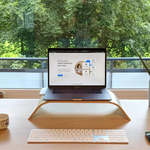
Portable laptop stands offer significant benefits to those who work on a laptop for more than a few hours per day. Laptop stands elevate the screen to help reduce neck strain and encourage a more comfortable viewing position.
Many laptop stands are made of aluminum, which makes them both durable and portable. A stand is an excellent alternative for those who find that a hotel bed is not comfortable enough to work from.
A laptop stand typically uses a folding mechanism that allows it to fit into a laptop bag while taking up minimal space. Prioritize stability, height adjustability, and an overall low-profile design when searching for a stand.
Best for: Laptop stands benefit remote workers who spend long hours working at desks, hotels, or other temporary workspaces.
Shop Portable Laptop Stands on Amazon.com
2. Compact Wireless Mouse
While laptop trackpads typically suffice for basic tasks, a separate mouse can make some operations significantly more comfortable. Many laptops support Bluetooth mice, which are extremely portable and take up very little space in a bag.
Some travelers may prefer a mouse with a USB receiver, while Bluetooth mice offer the advantage of not requiring a separate receiver.
A compact wireless mouse is especially beneficial to those who regularly work with spreadsheets, presentation software, graphic design programs, and multiple browser tabs.
When choosing a wireless mouse, prioritize a comfortable shape, reliable connectivity, and a silent-click mechanism. Some mice can be rather loud and disruptive when used in a library or another quiet workspace.
Best for: Professionals who regularly use spreadsheets, graphic design programs, and other productivity applications.
Shop Compact Wireless Mice on Amazon.com
3. USB-C Hub or Multiport Adapter
When working away from your usual desk, it is easy to leave a required peripheral at home. Connecting an external display, keyboard, mouse, and USB drive simultaneously can prove difficult, particularly for laptops with a limited selection of ports.
A USB-C hub can greatly benefit those who need to connect multiple devices while traveling. Many USB-C hubs support a variety of connections, including USB-A, HDMI, and SD card slots.
Before purchasing a USB-C hub, examine your laptop to determine which additional connections are available and which accessories you need. Not all USB-C ports support video output or the same charging capabilities, and not all HDMI connections are compatible with every display.
Best for: Remote workers who need to connect multiple devices but have limited ports available on their laptops.
4. Portable Laptop Charger or Power Bank
Working away from home can be challenging, particularly when power outlets are not readily available. A portable power bank can help you avoid interruptions caused by a low laptop battery.
Many USB power banks can charge laptops, but not every power bank is compatible with every device. A suitable power output and USB-C Power Delivery support can allow a power bank to deliver sufficient power. Always examine the laptop and power bank specifications to determine whether a portable charger is a suitable option.
In some cases, a laptop power bank is much more practical than a small phone-only power bank. Power banks also have restrictions on capacity and size when carried on an airplane, so it is important to check airline regulations before purchasing one.
Best for: Laptop power banks benefit travelers who use transportation with limited access to power outlets.
Shop Laptop Power Banks on Amazon.com
5. Lightweight Laptop Backpack
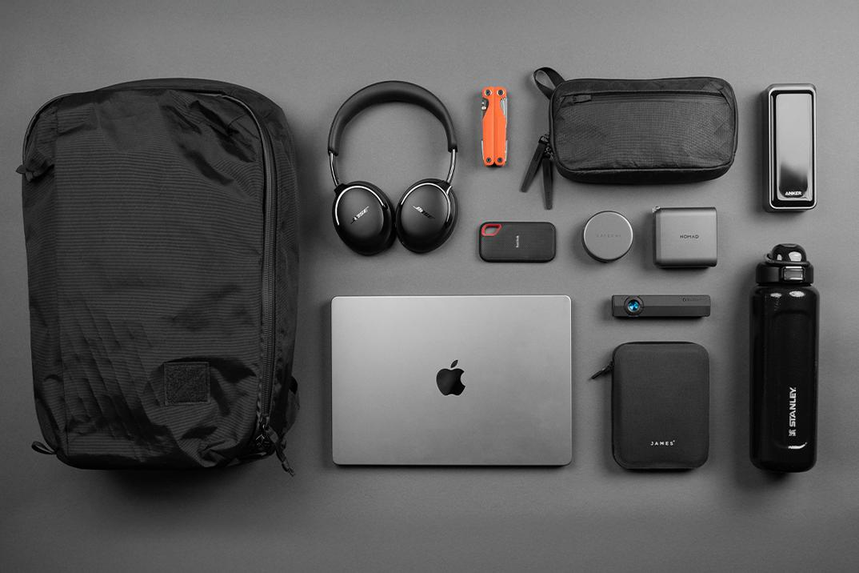
A laptop backpack can store and protect a laptop and its accessories, reducing the risk of devices getting scratched, wet, or damaged.
Laptop backpacks distribute the weight of a computer and its accessories more evenly than many shoulder bags, which can be uncomfortable when carrying heavier items. Prioritize comfort, security, and overall utility when purchasing a laptop backpack.
A laptop backpack should also be selected based on your laptop size and airline regulations. A full-size carry-on bag may exceed the allowed dimensions for certain types of in-cabin luggage, limiting where and when it can be used.
Many laptop backpacks offer additional compartments to help organize small accessories and personal items.
Laptop bags can also be made from water-resistant materials that help protect against light rain and other weather conditions. While water-resistant materials provide an added layer of protection, the bag should not be considered waterproof.
Some laptop backpacks provide additional organizational features, such as a luggage sleeve and separate pockets for cards and other essentials. These options may be beneficial for those who frequently travel by plane.
Best for: Remote workers who travel frequently and need a convenient way to carry their laptops and accessories.
Shop Laptop Backpacks on Amazon.com
6. Noise-Canceling Headphones
Working away from the office can often mean working in a public space, such as a coffee shop or hotel. These environments can be noisy, making it more difficult to concentrate or take an important phone call.
Noise-canceling headphones can reduce background noise and create a more productive environment. Some headphones also include a built-in microphone that can help improve call quality.
When purchasing noise-canceling headphones, consider comfort and portability for travel. Long battery life, Bluetooth connectivity, and a foldable design are useful features for many remote workers.
Those who frequently participate in video conferences may also want to consider call quality and overall microphone performance. While many headphones offer effective noise cancellation for general use, not all headphones deliver the same performance during phone calls.
Noise-canceling headphones do not block every sound and may still allow ambient noises, such as voices, to be heard.
Best for: Professionals who require concentration or frequently participate in video conferences.
Shop Noise-Canceling Headphones on Amazon.com
7. Portable External SSD
When working away from the office, laptop accessories that provide additional storage space can be invaluable. Remote workers often require extra storage for documents, spreadsheets, presentations, photographs, and video files.
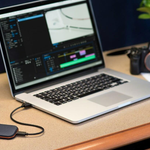
An external SSD can store files when a laptop’s internal storage is insufficient. Solid-state drives (SSDs) generally offer better resistance to everyday movement than traditional hard disk drives (HDDs) because they have no moving parts. An external SSD is also much more compact than many traditional external hard drives.
When purchasing an external SSD, consider the storage capacity and connection type. Those who store large files, such as photographs and videos, may want to consider a larger storage capacity, such as 1TB or more.
A larger storage device can provide better value depending on the price per terabyte. Large files typically require more storage space, so it is important to consider the intended use of the external SSD.
The connection type is also important, as many newer laptops primarily include USB-C ports. The connection and supported interface determine the potential transfer speed, which affects how quickly files can be moved.
Files can be transferred between an external SSD and a laptop directly, without requiring another computer or device.
While a portable external SSD can be useful in many situations, it is also worth considering cloud storage or a secondary backup drive. Keeping an additional copy of important files can help protect against data loss.
Remote workers should also consider data security measures, such as encryption and firewall protection, to help keep important documents secure.
Best for: Professionals in digital content creation, consulting, finance, and design who need portable storage for their work.
Shop Portable External SSDs on Amazon.com
8. Compact GaN Laptop Charger
Many laptops come with a large power adapter that can be bulky and difficult to transport. Compact gallium nitride (GaN) chargers can take up much less space while providing sufficient power for compatible devices.
A USB-C multiport charger can also be used to charge other devices, including smartphones, tablets, and laptops.
When purchasing a compact GaN laptop charger, consider laptop compatibility and overall power requirements.
GaN chargers can provide substantial power in a smaller package, so it is important to compare the advertised wattage, voltage, and supported charging standards.
For those who need to charge multiple USB devices, a USB-C multiport charger can be a valuable investment when traveling.
Some USB-C multiport chargers are compatible with a variety of laptops while still providing sufficient power. It is also important to consider the overall size, weight, and portability of a compact laptop charger.
For those who travel internationally, a travel adapter that accommodates different power outlets may also be necessary.
Best for: Frequent travelers who value portability and want to reduce the overall size and weight of their laptop accessories.
Shop Compact GaN Laptop Chargers on Amazon.com
9. Foldable Laptop Sleeve
Laptop sleeves add an extra layer of protection to a laptop and are typically used alongside a laptop backpack. A laptop sleeve can help prevent damage caused by other items in a bag, including laptop chargers, coins, and other small objects.
When purchasing a laptop sleeve, consider the overall fit, padding, and portability. Some sleeves use Velcro closures, while others feature zippers or magnetic closures. Make sure the interior provides sufficient padding for everyday use.
Many sleeves also include additional pockets for small objects, such as a wireless mouse, laptop charger, and other accessories. Those who travel frequently can benefit from laptop sleeves because they often use multiple modes of transportation.
It is also important to select the sleeve based on the laptop’s actual dimensions rather than just its screen size.
While a laptop sleeve adds an extra layer of protection, it is typically not as protective as a well-padded laptop backpack.
Best for: Laptop users who want additional protection against scratches and minor damage while traveling.
Shop Laptop Sleeves on Amazon.com
10. Portable Wi-Fi Hotspot
Many remote workers require a stable internet connection for work, including video conferencing, email, and accessing work documents in the cloud. Not all hotels provide a reliable internet connection, and some charge additional fees for access.
A portable Wi-Fi hotspot can provide an internet connection for laptops, tablets, and smartphones through a cellular network. Some hotspots use a physical SIM card, while others support an eSIM that can be activated digitally.
When purchasing a portable Wi-Fi hotspot, consider network compatibility, cellular coverage, battery life, data allowances, and security.
Those who travel internationally may want to consider a hotspot with a suitable battery capacity and support for the cellular networks available at their destinations.
It is also important to check the cellular compatibility of a portable hotspot. The appropriate network can vary by country, and some hotspots are limited to specific carriers or cellular bands.
While a portable hotspot can be a useful alternative to public Wi-Fi, it is not completely immune to interference. Signal strength and stability depend on cellular coverage, network congestion, and local conditions.
Best for: Digital nomads and business travelers who need internet access while working away from home.
Shop Portable Wi-Fi Hotspots on Amazon.com
11. Cable Organizer and Travel Pouch
Organizing laptop accessories can be considerably more difficult when away from the office. A travel pouch or organizer can help keep small items, including a wireless mouse, laptop charger, cables, and adapters, together in one place.
Those who travel with multiple laptops, laptop accessories, and other devices can benefit from an organizer that provides enough room for smaller items.
Cable organizers help prevent tangles and make it easier to keep track of accessories, such as laptop chargers and USB-C cables. A travel organizer can also reduce the amount of space these accessories take up in a bag.
A medium-sized travel organizer often provides a useful balance between capacity and portability. A larger organizer may take up too much room, while a smaller one may not provide enough space.
Organizers typically use a zipper closure, so it is important to ensure that the organizer is large enough to hold the items you need.
Best for: Travelers who need additional organization for laptop accessories and other small electronic devices.
Shop Electronics Travel Organizers on Amazon.com
12. Portable Laptop Privacy Screen
Many remote workers handle confidential information, such as financial reports and personal data. A laptop privacy screen can help reduce the visibility of on-screen content to people viewing the display from the side.
Many laptop privacy screens use magnets or adhesive strips to attach to the display. Some screens are removable, while others are designed for more permanent installation.
It is important to consider the laptop’s screen size, aspect ratio, and overall dimensions before purchasing a privacy screen. A privacy filter typically provides limited value unless it fits the laptop correctly.
Privacy screens can also reduce the brightness of the laptop display, so it may be necessary to adjust the screen settings.
A privacy screen provides only one layer of security for sensitive information. Other laptop security measures, such as strong passwords, encryption, and automatic screen locking, can provide additional protection.
Best for: Professionals who handle sensitive client information and work in public spaces.
Shop Laptop Privacy Screens on Amazon.com
13. Compact Travel Keyboard
A compact travel keyboard can improve productivity for many remote workers.
Some travelers prefer a separate keyboard because using a laptop keyboard can become awkward when the laptop is positioned on a stand. A compact keyboard with a wired or Bluetooth connection can improve comfort and convenience when used alongside a laptop stand.
Most travel keyboards use Bluetooth connectivity and require pairing with the laptop. A compact wireless keyboard typically weighs less and takes up less space than a full-size wired keyboard. Those who travel internationally may also prefer a wired keyboard that uses a standard USB Type-A connection, provided their laptop supports it or they have a suitable adapter.
Many writers, developers, and administrators find that a compact external keyboard is more comfortable for extended typing sessions.
Some keyboards also include additional features, such as a built-in trackpad that can replace a separate mouse. A compact travel keyboard may provide a more familiar typing experience for those who regularly write long documents.
When purchasing a compact keyboard, make sure it is compatible with your laptop or computer. You should also consider its portability, battery life, and overall utility.
Best for: Writers, developers, accountants, administrators, and other professionals who regularly type for extended periods.
Shop Compact Wireless Keyboards on Amazon.com
14. Universal Travel Adapter
Many remote workers travel with their laptops between different countries. A universal travel adapter can provide a compatible plug connection for laptop chargers and other electronic devices.
Those who travel internationally should also consider the specific power requirements of their laptop, including the voltage and wattage supported by the charger.
Many modern laptops use USB-C charging, which provides a widely supported connection for laptops and portable accessories.
While a travel adapter can adapt a plug to fit different electrical outlets, it is not necessarily a voltage converter. Many modern laptop chargers support multiple input voltages, but it is important to check the charger’s specifications before using it abroad.
Best for: Remote workers who travel internationally between countries that use different power outlet types.
Shop Universal Travel Adapters on Amazon.com
How to Choose the Best Laptop Accessories for Travel
Those who travel occasionally may only need a few laptop accessories. Some of the most useful options for remote workers include a laptop stand, wireless mouse, USB-C hub, laptop bag, and noise-canceling headphones.
It is especially important to ensure that portable laptop accessories are compatible with your laptop, including their connections and supported ports.
Accessories such as a laptop stand, mouse, and keyboard can improve productivity when working away from the office. It is also important to choose a comfortable laptop bag or backpack that provides adequate protection.
Remote workers must also consider the security and integrity of their data and equipment. A secure and reliable laptop bag or backpack can help protect a laptop from damage and reduce the risk of theft. Those who work with sensitive information should also consider data security measures, including strong passwords, encryption, and appropriate cybersecurity software.
While it can be tempting to purchase every new laptop accessory available, it is often best to start with the accessories that provide the most value for your travel needs.
Quick Comparison: Best Laptop Accessories for Remote Workers Who Travel
| Laptop Accessory | Main Benefit | Best For | Amazon.com |
|---|---|---|---|
| Portable Laptop Stand | Improves screen positioning and comfort | Long working sessions | Shop Now |
| Compact Wireless Mouse | Easier navigation and control | Office tasks and design work | Shop Now |
| USB-C Hub | Expands available laptop ports | Connecting multiple devices | Shop Now |
| Laptop Power Bank | Provides extra battery power | Working away from outlets | Shop Now |
| Laptop Backpack | Protects and organizes equipment | Frequent travelers | Shop Now |
| Noise-Canceling Headphones | Reduces distracting background noise | Video calls and focused work | Shop Now |
| Portable External SSD | Adds portable storage | Large files and backups | Shop Now |
| Compact GaN Charger | Reduces charger size and weight | Frequent flyers | Shop Now |
| Laptop Sleeve | Adds protection against scratches | Everyday laptop transport | Shop Now |
| Portable Wi-Fi Hotspot | Provides cellular internet access | Digital nomads and business travelers | Shop Now |
| Cable Organizer | Keeps accessories and cables organized | Travelers carrying multiple gadgets | Shop Now |
| Laptop Privacy Screen | Limits side-angle screen visibility | Working with sensitive information | Shop Now |
| Compact Travel Keyboard | Provides a separate typing surface | Writers and developers | Shop Now |
| Universal Travel Adapter | Supports different outlet types | International travelers | Shop Now |
Amazon Affiliate Disclosure: As an Amazon Associate, I earn from qualifying purchases. If you buy something after clicking an Amazon.com link in this article, I may earn a commission.