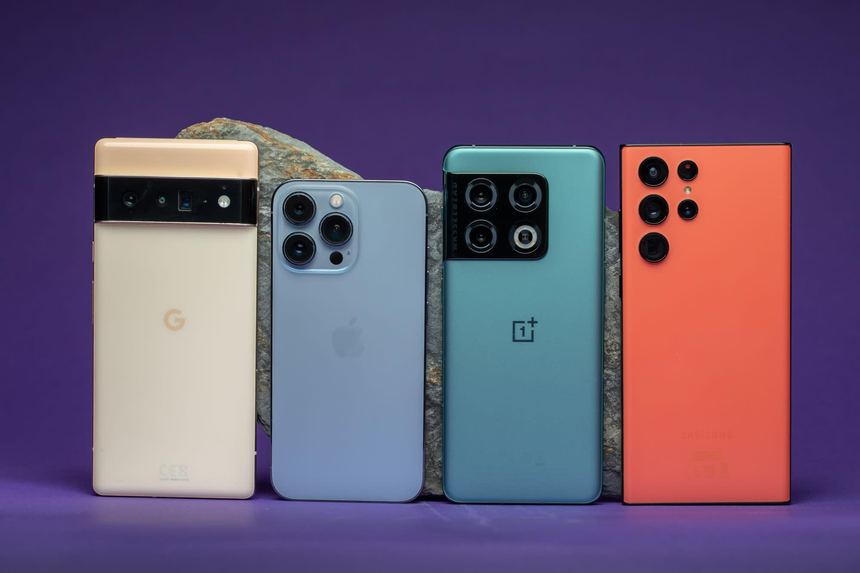
Two people can buy Android phones and open the same app, yet have very different experiences. On one device, the menus may be simple, with few visual elements. Another phone might feature colorful menus, animations, and additional tools.
These differences are not determined by the processor or price alone. Much of the experience comes from the way manufacturers customize Android.
Google develops the Android operating system, but manufacturers such as Samsung, Motorola, and OnePlus adapt the software to their own devices. This gives buyers a wide selection of phones, but it also means the Android experience is not standardized across every brand.
Android OS Is the Foundation for Customization
Think of Android as the foundation of a house. The foundation supports the structure, but manufacturers have considerable freedom in how they build on top of it.
They can change icons, menus, and other visual elements. Some manufacturers install additional applications, while others redesign the camera interface or add their own privacy tools. The result is an Android phone with a distinctive combination of features and functions.
That is why learning to use one brand’s device does not necessarily prepare someone for another’s.
Some manufacturers build their interfaces around Google services, while others offer more customization options and manufacturer-specific tools. There is no single approach that every company must follow.
Android Phones Have Different Features and Interfaces
Google Pixel: A Google-Centered Experience
Google Pixel smartphones offer an Android experience closely connected to Google’s services and tools. Google develops both the devices and their software, combining familiar Android features with its own interface design and additional capabilities.
Pixel phones can appeal to people who prefer a relatively straightforward interface and easy access to Google services.
However, Pixel software is not entirely untouched Android. Google adds its own tools, visual elements, and camera features. Whether these additions are an advantage depends on the buyer’s preferences.
Explore examples: Google Pixel phones on Amazon.com
Samsung Galaxy: More Tools and Customization
Samsung’s Android phones use a custom interface known as One UI. It includes Samsung’s own applications, visual elements, and additional features. Depending on the model, users may find extensive customization options, privacy tools, multitasking functions, and integration with other Samsung devices.
This approach can suit buyers who want more control over their phones and prefer connecting multiple devices within one ecosystem. Samsung sells products such as tablets and smartwatches that can work alongside compatible Galaxy phones.
The trade-off is that the additional settings and tools may take time to learn, particularly for someone switching from a simpler interface.
Explore examples: Samsung Galaxy Android phones on Amazon.com
OnePlus: Customization and Performance
OnePlus smartphones use OxygenOS, the company’s customized Android interface. The experience combines Android features with OnePlus-specific tools and design choices, although the details vary by phone model and software version.
Some users appreciate the combination of performance-focused hardware and customization options. Others may notice similarities between OxygenOS and the software used by other Android manufacturers.
Rather than relying on the brand’s general reputation, it is worth researching the software version and features available on the specific OnePlus model being considered.
Explore examples: OnePlus Android phones on Amazon.com
Motorola: A Familiar Interface With Extra Features
Motorola generally keeps its Android interface relatively familiar while adding its own tools and functions. Depending on the device, these may include gesture controls, shortcuts, and personalization options designed to make everyday tasks easier.
For example, a user might perform a particular gesture to launch a frequently used function instead of navigating through several menus. These additions can improve convenience without dramatically changing the overall interface.
Motorola phones can suit people who want familiar Android navigation with a few practical extras. Since the available features vary by model, checking the specifications and software details before buying is worthwhile.
Explore examples: Motorola Android phones on Amazon.com
Other Differences in Android Phone Interfaces
The differences between Android phones go beyond RAM, storage, and processor specifications. Many come down to manufacturers’ software decisions.
Here are some areas where the experience can vary:
- Notifications and quick settings: Manufacturers arrange toggle buttons, switches, and notification controls differently, changing how users access common functions.
- Home screen: Some interfaces offer extensive options for widgets, icons, layouts, and personalization, while others emphasize simplicity.
- Preinstalled apps: The selection of applications can vary by manufacturer, carrier, device model, and region.
- Camera software: Even when two phones have similar camera hardware, image processing, shooting modes, and camera controls can produce different experiences.
- Privacy and phone settings: Permission controls, security features, and other settings may appear in different menus, making the interface feel unfamiliar after switching brands.
These phones do not necessarily use entirely different operating systems. Instead, their individual design choices and features add up to create distinct experiences. The situation is somewhat similar to how Windows and macOS have developed different interfaces despite serving many of the same basic computing purposes.
One Major Difference Between Android Phones: Software Updates
Software updates are another important reason Android phones can feel different.
Google develops Android releases, but manufacturers must adapt updates to their own devices. This process can involve adjusting the interface, checking hardware compatibility, testing features, and coordinating with mobile carriers.
As a result, two Android phones may run different software versions or receive security updates on different schedules. Even phones from the same manufacturer can have different support periods.
The update schedule is just as important to consider as a phone’s price, hardware, and interface. A more expensive device may be worth considering if it comes with a longer support commitment, particularly for someone who plans to keep it for several years.
Some manufacturers publish their update policies for individual models or product lines. Checking the expected operating-system upgrades and security-update period before purchasing can help buyers make a more informed decision.
Software Is Only Part of a Phone’s Feel
Software plays a major role in shaping the Android experience, but hardware also matters.
A budget phone with limited memory may respond differently from a flagship device with a faster processor and more RAM. Beyond those specifications, screen quality, speakers, vibration motors, battery capacity, and heat management can influence how a phone feels during everyday use.
Even the same interface can behave differently on different hardware. Animations may appear smoother on a more powerful device, while demanding games or camera functions may take longer on a less capable phone.
This is why comparing devices based only on their software or processor names can be misleading. The combination of hardware and software determines much of the overall experience.
Flagship phones generally offer more advanced components than budget models, but buying the most expensive phone is not always necessary. The better approach is to find a device that offers sufficient performance, reliable software support, and the features needed for everyday use.
Which Android Experience Is Right for You?
When shopping for an Android phone, it is better to narrow the choices according to personal preferences than to look for one universally superior device.
Someone who prefers a straightforward interface and Google services might start by comparing Google Pixel models. A buyer who wants more built-in tools and connected-device features may prefer Samsung Galaxy phones. OnePlus can appeal to people interested in performance and customization, while Motorola offers options for those who prefer familiar Android navigation with practical additions.
These categories are only starting points. Each manufacturer sells multiple phone lines, and the features available can differ considerably between models.
It is worth comparing phones in the same price range and looking at their update commitments, camera quality, battery life, display, and overall performance. Trying different interfaces in a physical store can also help buyers understand which one feels most comfortable.
The best choice is not necessarily the phone with the most features. It is the one that offers the right balance of price, usability, hardware, and long-term support.
The Final Word on Why Android Phones Feel Different
Android phones feel different because manufacturers customize the software in their own ways. Google Pixel, Samsung Galaxy, OnePlus, and Motorola each offer distinct approaches to Android, with different tools, features, and interface designs.
These differences can make a phone feel unfamiliar to someone who has used another brand. They can also influence everyday functionality, from accessing privacy settings to using the camera or customizing the home screen.
This variety is one of Android’s main advantages. Buyers can choose a device that matches their preferred interface and way of working rather than being limited to a single experience.
Before purchasing a phone, consider its interface, hardware, software-update policy, and price. Finding the right combination can make everyday tasks easier and help ensure that the device remains useful for years to come.
Amazon Affiliate Disclosure: As an Amazon Associate, I earn from qualifying purchases. If you click on an Amazon.com link in this article and make a purchase, I may earn a commission at no additional cost to you.